

How to List Your Business on ChatGPT in India (2026 Guide)
If you want to list your business on ChatGPT in India, there are now two routes. On 10 November 2026, OpenAI launched Businesses in ChatGPT (beta), which lets eligible businesses claim a profile through ChatGPT Business Hub. The second route is organic: making sure ChatGPT finds, trusts, and recommends your business when people ask questions like “best interior designer in Pune” or “top CA firms in Bengaluru”.
This guide explains both routes step by step, what Indian businesses can and cannot do right now, and how to improve your chances of being recommended.
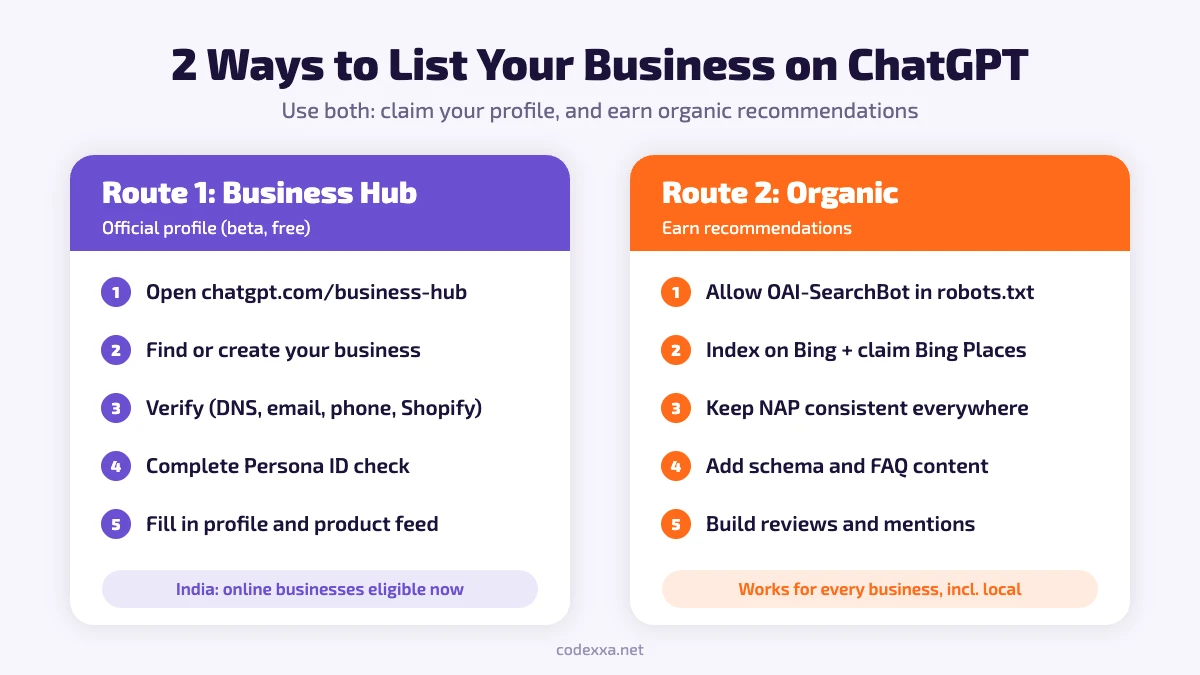
Key takeaways
- You can list your business on ChatGPT through ChatGPT Business Hub (chatgpt.com/business-hub). It is free during the beta.
- In India, online businesses with a website (ecommerce, SaaS, agencies, online services) can claim or create a profile today. Local stores and restaurants outside the US cannot claim yet.
- Claiming a profile does not guarantee recommendations. ChatGPT still decides independently which businesses to mention.
- Organic visibility depends on your website, Bing’s index, trusted directories, reviews, and third-party mentions.
- Allow OAI-SearchBot in your robots.txt. Blocking it removes your site from ChatGPT search answers.
Can You List Your Business on ChatGPT?
Yes. Since November 2026, you can list your business on ChatGPT directly through Business Hub. OpenAI describes it as a way for businesses to claim their business, manage their information, and see insights on how people engage with them in ChatGPT.
Before this launch, there was no “submit” button. ChatGPT learned about businesses only from its training data and from live web search. That organic route still matters, because a claimed profile is only one of the signals ChatGPT uses.
There are two ways your business can appear in ChatGPT:
- As a recommendation, when ChatGPT suggests your business by name (for example, “Here are five digital marketing agencies in Pune…”).
- As a cited source, when ChatGPT links to a page on your website to support its answer.
Why ChatGPT Visibility Matters for Indian Businesses
India is now one of the most important markets for AI search. OpenAI said in February 2026 that India had passed 100 million weekly active ChatGPT users. By November 2026, OpenAI India’s managing director said India had become ChatGPT’s largest market by weekly active users, with the user base doubling since January.
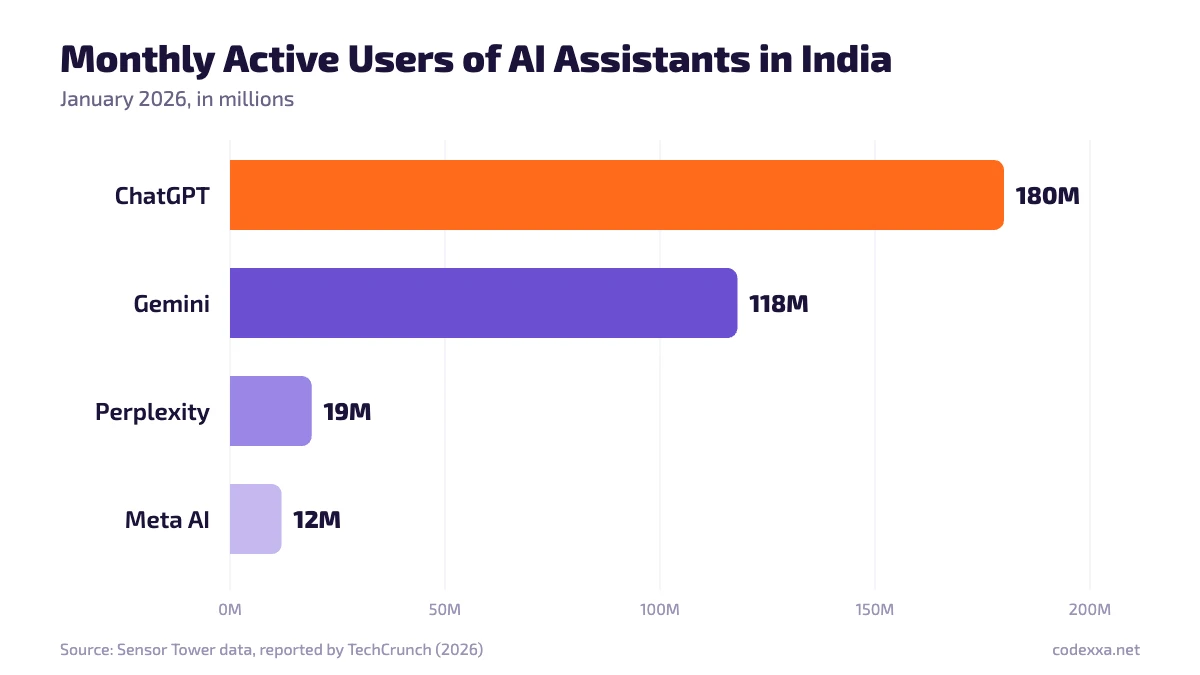
ChatGPT also leads other AI assistants in India by a wide margin. According to Sensor Tower data reported by TechCrunch, it had 180 million monthly active users in India in January 2026.
When this many people ask an AI assistant for recommendations, a business that ChatGPT does not know about loses enquiries it never sees. This is why AI search visibility, often called Answer Engine Optimization (AEO) or Generative Engine Optimization (GEO), is becoming part of a modern AI-powered digital marketing strategy.
How ChatGPT Finds and Recommends Businesses
ChatGPT combines what it learned during training with live web search. For local and commercial questions, it pulls information from several types of sources.
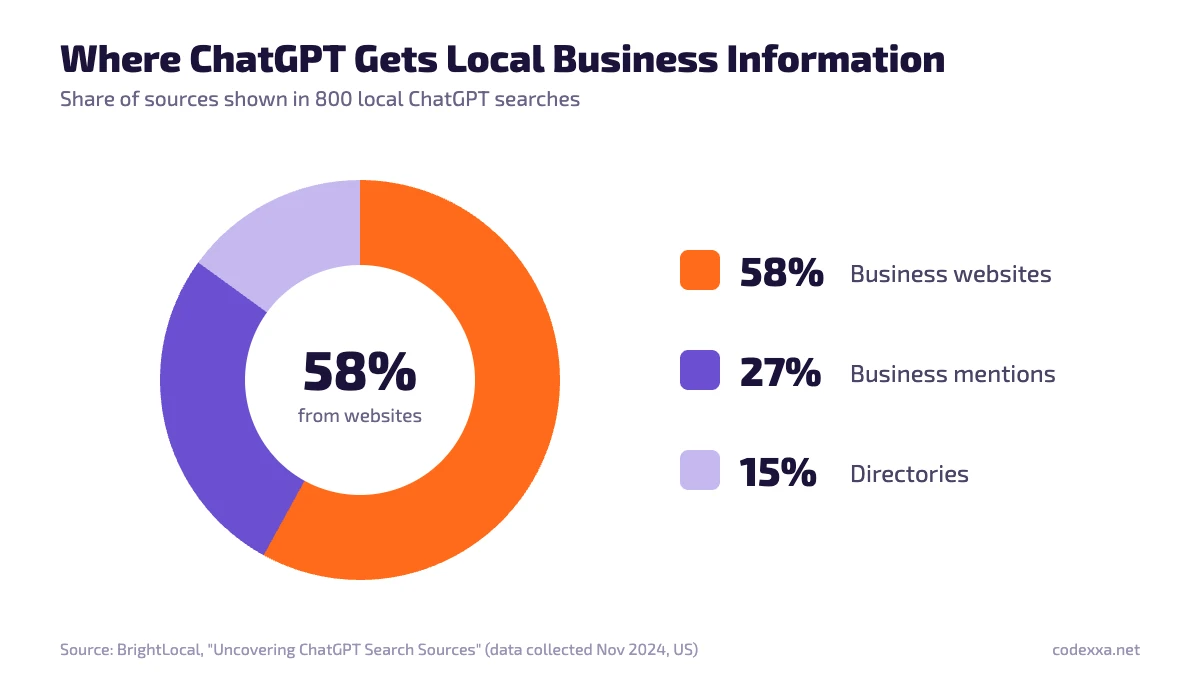
A BrightLocal study of 800 local searches in ChatGPT found that business websites made up 58% of the sources ChatGPT showed, business mentions on other sites 27%, and directories 15%. The study was run in November 2024 and in the US, so treat the exact numbers as directional, but the pattern is clear: your own website is the biggest single source.
| Source | What ChatGPT uses it for | What you should do |
|---|---|---|
| ChatGPT Business Hub | Verified business details, logo, description, product feed | Claim or create your profile |
| Your website | Services, locations, prices, FAQs, proof of expertise | Make pages clear, crawlable, and specific |
| Bing search index | Live web results for many ChatGPT searches | Verify your site in Bing Webmaster Tools |
| Business directories | Confirming name, address, phone, category, reviews | Keep listings complete and consistent |
| Reviews | Reputation and trust signals | Collect genuine reviews on major platforms |
| Third-party mentions | Independent validation (news, lists, Wikipedia, blogs) | Earn coverage and “best of” mentions |
Method 1: Claim Your Business in ChatGPT Business Hub
This is the official way to list your business on ChatGPT. It takes about 20 to 30 minutes of form-filling, plus OpenAI’s review time.
Who Can Use Business Hub in India?
| Business type | Can it claim in India today? | Notes |
|---|---|---|
| Online store or ecommerce brand | Yes | Shopify stores can connect directly for faster verification |
| SaaS or software company | Yes | Claim using your website domain |
| Service business with a website (agency, consultancy, CA firm, coaching) | Yes | Treated as a “website” business |
| Local store or restaurant (physical location) | Not yet | OpenAI currently allows physical-location claims only for existing US listings |
| Business Agents (AI agent that chats for your business) | Not yet | Limited to eligible US ecommerce and online service businesses |
Eligibility also depends on your industry and on OpenAI’s verification and integrity checks, and Business Hub is still in beta, so these rules may change.
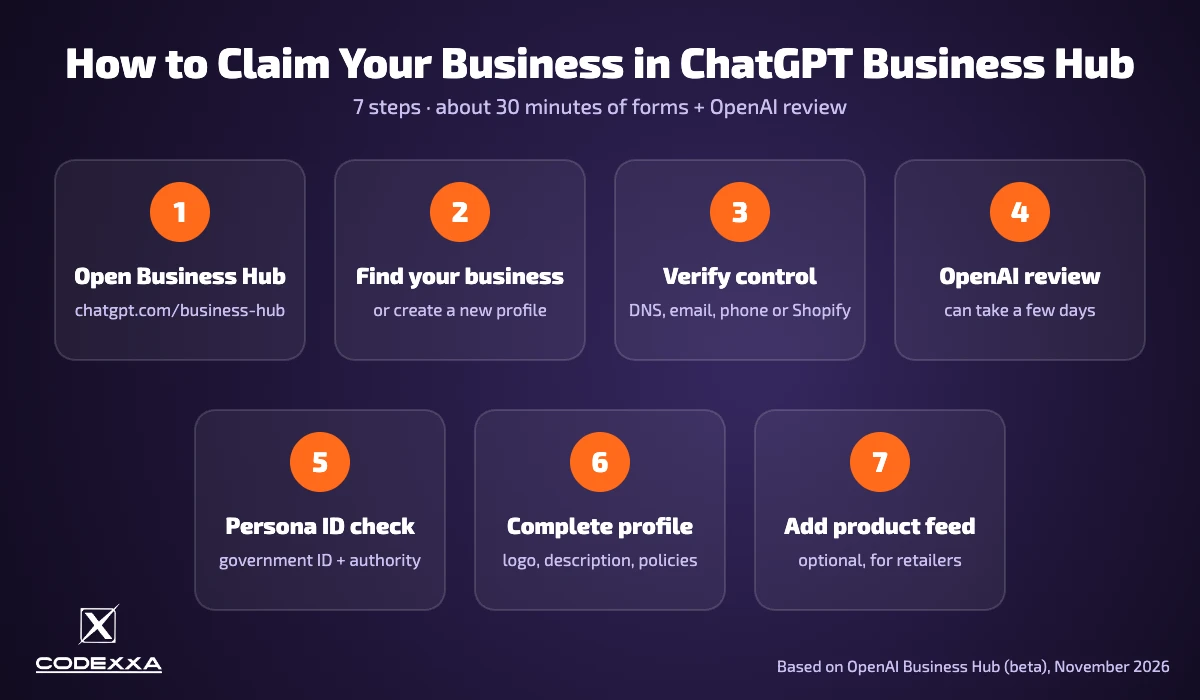
Step-by-Step: How to Add Your Business to ChatGPT
- Open Business Hub. Sign in to ChatGPT and go to chatgpt.com/business-hub.
- Search for your business. If a matching listing exists, select it. If not, choose the option to create a new profile and pick “website” (or “physical location” if you are eligible).
- Verify that you control the business. Choose one of the available methods: business phone, business email, a DNS TXT record on your website domain, or a Shopify store connection.
- Wait for OpenAI’s review. Claims on existing listings are reviewed, which can take a few days.
- Complete identity verification with Persona. You will need a government-issued ID, business details, and proof that you are authorised to represent the business.
- Complete your profile. Add your website, a clear description, category, logo, cover photo, contact details, and delivery and return policies if you sell products.
- Add a product feed (optional). Retailers can connect Shopify, upload a CSV, or link a hosted feed with prices and availability.
Tip: DNS verification is usually the most reliable method because it does not depend on old phone numbers or emails that may be on file. Ask whoever manages your domain (GoDaddy, Hostinger, Cloudflare, etc.) to add the TXT record while you are on the verification screen.
Business Hub Verification Methods Compared
| Method | What you need | Best for |
|---|---|---|
| Website domain (DNS TXT record) | Access to your domain’s DNS settings | Most businesses with a website |
| Business email | Access to the email address on file | Businesses with a domain email |
| Business phone | Access to the phone number on file | Businesses with a listed phone number |
| Shopify store | Shopify admin login | Shopify merchants |
What You Get After Claiming
- A business profile that people can open when your business appears in an answer, with a blue check once identity verification is approved.
- Control over key details, such as your description, category, logo, and policies.
- Insights for the last 28 days, including mentions, website clicks, and discovery topics (grouped themes, not individual conversations).
- Team and agency access, so your marketing partner can help manage the profile.
OpenAI says businesses do not receive users’ individual conversations, and that paying for ChatGPT ads does not change how often ChatGPT recommends a business.
Method 2: Get Recommended by ChatGPT Organically
Whether or not you can claim a profile yet, these steps decide whether ChatGPT actually mentions you. They also help local businesses in India that are not yet eligible for Business Hub.
1. Allow OpenAI’s Search Crawler
OpenAI uses OAI-SearchBot to find pages for ChatGPT search. Its documentation says sites that block OAI-SearchBot will not be shown in ChatGPT search answers. Check your robots.txt file (yourdomain.com/robots.txt) and make sure it does not block it:
User-agent: OAI-SearchBot
Allow: /

# Optional: block model training without affecting search
User-agent: GPTBot
Disallow: /
Changes to robots.txt can take around 24 hours to take effect. Also check that your firewall, CDN, or security plugin is not blocking OpenAI’s published IP ranges.
2. Get Indexed on Bing and Claim Bing Places
Several independent studies suggest ChatGPT relies heavily on Bing’s index for live web results. Verify your site in Bing Webmaster Tools, submit your XML sitemap, and claim your Bing Places for Business listing. You can import your existing Google Business Profile into Bing Places in a few minutes.
3. Keep Your Business Details Consistent Everywhere
ChatGPT cross-checks information. If your name, address, phone number, and category differ between your website, Google Business Profile, Bing Places, and directories, it has less confidence in recommending you. Use the exact same NAP (name, address, phone) everywhere.
4. List Your Business on Trusted Indian Directories
Choose platforms relevant to your industry and keep each listing complete, with photos, hours, services, and reviews.
| Industry | Directories and platforms worth listing on |
|---|---|
| All businesses | Google Business Profile, Bing Places, JustDial, Sulekha, LinkedIn company page |
| B2B and manufacturing | IndiaMART, TradeIndia, ExportersIndia |
| Healthcare | Practo, Lybrate, hospital and doctor association directories |
| Restaurants and cafes | Zomato, Swiggy, Tripadvisor, EazyDiner |
| Hotels and travel | MakeMyTrip, Booking.com, Tripadvisor, Agoda |
| Software and SaaS | G2, Capterra, Product Hunt, Clutch |
| Agencies and IT services | Clutch, GoodFirms, DesignRush |
5. Write Answer-Ready Website Content
ChatGPT looks for pages that answer questions clearly. Create pages that state exactly what you do, where, for whom, and at what price range. Add an FAQ section that answers real customer questions in two or three sentences each. Specific, factual content (“We are a GST-registered CA firm in Baner, Pune, serving startups since 2015”) is easier for AI to understand and cite than vague marketing copy.
6. Add Structured Data (Schema Markup)
Schema markup helps AI systems read your business details without guessing. Add Organization or LocalBusiness schema to your homepage and contact page, and FAQPage schema to FAQ sections. Plugins such as Rank Math or Yoast can add most of this without code.
7. Build Genuine Reviews
Ask happy customers to review you on Google, and on industry platforms such as Practo, Zomato, or G2. Reply to reviews, including negative ones. Never buy fake reviews: they violate platform policies and damage trust.
8. Earn Mentions on Other Websites
Third-party mentions tell ChatGPT that others vouch for you. Aim for coverage in local news, industry publications, “best of” lists, podcasts, and partner websites. A consistent social media marketing strategy also helps people discover and talk about your brand.
ChatGPT Business Hub vs Google Business Profile vs Bing Places
Swipe the table to compare all three →
| Feature | ChatGPT Business Hub | Google Business Profile | Bing Places |
|---|---|---|---|
| Where it shows | ChatGPT answers and business profiles | Google Search, Maps, AI Overviews | Bing Search, Bing Maps, Copilot |
| Cost | Free (beta) | Free | Free |
| Local stores in India | Not yet | Yes | Yes |
| Online-only businesses | Yes | Limited (service-area setup) | Limited |
| Verification | Phone, email, DNS, or Shopify, plus Persona ID check | Postcard, phone, email, or video | Phone, email, or Google import |
| Insights | Mentions, clicks, discovery topics (28 days) | Views, calls, directions, searches | Views and clicks |
| Product feed | Yes (CSV, hosted file, Shopify) | Yes (via Merchant Center) | Limited |
The practical takeaway: these platforms work together. Keep all three complete and consistent.
How to Check Whether ChatGPT Knows Your Business
Open ChatGPT (with search turned on) and try prompts your customers would actually use. Note whether your business appears, what it says, and which sources it cites.
| Prompt to test | What it tells you |
|---|---|
| “What is [your business name]?” | Whether ChatGPT knows you and describes you correctly |
| “Best [your service] in [your city]” | Whether you appear in local recommendations |
| “[Your business] vs [competitor]” | How ChatGPT compares you with competitors |
| “Is [your business] good? Reviews?” | What reputation signals it finds |
| “Who offers [specific service] for [audience] in India?” | Whether your niche positioning is clear |
Repeat these tests every month. If you have claimed your profile, compare the results with the mentions and clicks in Business Hub insights.
Common Mistakes to Avoid
- Blocking OAI-SearchBot in robots.txt or through a security plugin without realising it.
- Inconsistent business details across your website, Google, Bing, and directories.
- Thin service pages that do not say what you offer, where, or for whom.
- Expecting a claimed profile to guarantee recommendations. It improves accuracy, not ranking.
- Ignoring Bing. Many Indian businesses never claim Bing Places, even though it matters for ChatGPT.
- Publishing a profile in a hurry. OpenAI’s support cannot delete or hide a published profile, so check every detail before publishing.
30-Day Action Plan to List Your Business on ChatGPT
| Week | Actions |
|---|---|
| Week 1 | Check robots.txt for OAI-SearchBot, verify Bing Webmaster Tools, claim Bing Places, and claim or create your ChatGPT Business Hub profile if eligible |
| Week 2 | Fix NAP consistency across Google, Bing, JustDial, and industry directories; add Organization or LocalBusiness schema |
| Week 3 | Rewrite key service pages with clear, specific answers; add FAQ sections with FAQPage schema |
| Week 4 | Start a review collection process, pitch two or three industry publications or lists, and run your first ChatGPT visibility test |
AI visibility builds over time, just like traditional SEO. Track results monthly and connect them to the rest of your performance marketing strategy.
Frequently Asked Questions
Is it free to list your business on ChatGPT?
Yes. ChatGPT Business Hub is free during the beta. You do not need a ChatGPT Enterprise plan or an ads account. OpenAI has not said whether paid features will be added later.
Can Indian businesses use ChatGPT Business Hub?
Yes, if you run an online business with a website, such as an ecommerce store, SaaS product, agency, or online service. Local stores and restaurants outside the US cannot claim a physical-location listing yet, and Business Agents are currently limited to eligible US businesses.
How long does it take to get listed on ChatGPT?
The Business Hub forms take about 20 to 30 minutes. OpenAI’s review of a claim can take a few days. Organic visibility, where ChatGPT starts recommending you on its own, usually takes weeks or months of consistent work on your website, listings, reviews, and mentions.
Does claiming my business guarantee that ChatGPT will recommend it?
No. OpenAI says ChatGPT continues to make independent recommendations. A claimed profile helps ChatGPT show accurate information about your business, but recommendations still depend on relevance, trust, and the other sources ChatGPT finds.
Can I pay to rank higher in ChatGPT?
No. OpenAI says paying for ChatGPT ads does not change how often ChatGPT recommends a business in its regular answers. Ads, where available, are shown and labelled separately.
Does ChatGPT use my Google Business Profile?
OpenAI has not said that ChatGPT reads Google Business Profile directly, and independent studies suggest it relies more on Bing and on websites, directories, and reviews. Your Google Business Profile details are still repeated across the web, so keep them accurate and consistent with your other listings.
Why is my business not showing up in ChatGPT?
The most common reasons are a robots.txt or firewall rule blocking OAI-SearchBot, a website that Bing has not indexed, inconsistent business details across listings, thin service pages, few reviews, and no third-party mentions. Fix these first, then test again with real customer prompts.
What is the difference between ChatGPT Business and Businesses in ChatGPT?
ChatGPT Business is a paid workspace plan that lets teams use ChatGPT together. Businesses in ChatGPT is the free beta feature that lets you list your business on ChatGPT, manage your profile in Business Hub, and see insights.
Can my marketing agency manage my ChatGPT business profile?
Yes. Business Hub supports teammate and agency access. However, the claim and identity verification must be completed by the business owner or someone authorised to represent the business, using their own government ID.
How do I update my business information in ChatGPT?
After your claim and verification are approved, you can edit your description, category, logo, contact details, and policies in Business Hub. ChatGPT may still use other sources, so update your website, Google Business Profile, Bing Places, and directories at the same time.
Conclusion
You can now list your business on ChatGPT through Business Hub, and Indian online businesses can start today. Local stores and restaurants in India will have to wait for OpenAI to expand, but they can still prepare by fixing the signals ChatGPT already uses: a crawlable website, Bing visibility, consistent directory listings, genuine reviews, and independent mentions.
Do both: claim your profile where you can, and build the organic signals that make ChatGPT confident enough to recommend you.
Need help getting your business recommended by ChatGPT? As an SEO agency in India, Codexxa helps businesses with SEO, AEO, and AI search visibility, from Business Hub setup to content and schema. Contact Codexxa to get started.
Sources: OpenAI, OpenAI developer documentation, BrightLocal, TechCrunch, Inc42. Business Hub is in beta, so eligibility and features may change. We will update this guide as OpenAI expands availability.

Sam K
Sam K is a brand growth marketer with 8 years of experience helping D2C, ecommerce and B2B brands grow through performance marketing, SEO, content and influencer campaigns. At Codexxa, Sam writes practical, data-backed guides on the strategies that turn marketing spend into measurable brand growth.
Related posts
AI Shopping in ChatGPT & Google: How to Get Your Products Found
How ChatGPT Shopping and Google AI Mode choose products, what changed in 2026, and the checklist Ind...
How to Grow Your Ecommerce Business with Digital Marketing and Scale Revenue in 2026
Growing an ecommerce business today is becoming more challenging as competition increases and custom...