
How to Sell on Zepto and Blinkit: Guide to Sell on Quick Commerce in 2026
Quick commerce is changing how customers discover and buy products, creating new growth opportunities for emerging and established brands alike.
If you are planning to expand your brand online, understanding how to sell on Zepto and Blinkit can give you a strong competitive advantage. These platforms are built for speed, convenience, and high purchase intent, which means your products reach customers ready to buy instantly.
However, getting listed alone is not enough anymore. Your success depends on how well you manage inventory, optimize product listings, maintain availability, and use ads to improve visibility across crowded quick commerce categories.
In this guide, you will learn the complete process of selling on Zepto and Blinkit, including registration, documentation, listings, operations, and growth strategies that can help your brand scale profitably in India’s fast-growing quick commerce market.
What Makes Zepto and Blinkit Different from Other Marketplaces?
Traditional marketplaces were built around product comparison. Whereas Zepto and Blinkit are built around speed, convenience, and immediate buying decisions.
When customers open quick commerce apps, they usually already know what they want to purchase, which completely changes how your products compete because availability, delivery readiness, and visibility directly influence conversions and repeat purchases on these platforms.
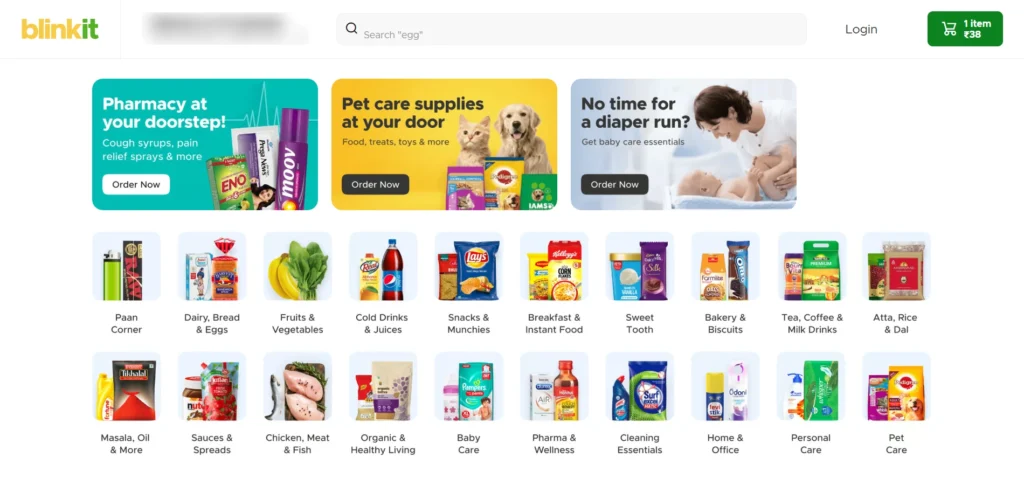
Unlike Amazon or Flipkart, Zepto and Blinkit use dark stores placed closer to customers across high-demand city locations.
This allows products to reach buyers within minutes, creating faster purchase cycles and higher repeat ordering opportunities for daily-use categories.
Your success on these quick commerce platforms depends less on massive catalogs and more on operational consistency and inventory planning.
Here is a simple comparison between traditional ecommerce marketplaces and quick commerce platforms:
| Platform Factor | Traditional Ecommerce | Zepto & Blinkit |
| Customer Intent | Research products | Instant purchases |
| Delivery Timeline | 1–3 days | 10–30 minutes |
| Inventory System | Central warehouses | Local dark stores |
| Main Growth Driver | Price competition | Availability and speed |
For your brand, this means quick commerce growth depends on staying visible, staying stocked, and fulfilling demand without delays.
Who Can Sell on Zepto and Blinkit?
Zepto and Blinkit mainly work with brands that can maintain fast-moving inventory, stable fulfillment, and consistent product availability daily.
If your products solve frequent purchase needs, quick commerce platforms can become a strong long-term customer acquisition channel for growth.
Most categories performing well on Zepto and Blinkit are already part of customers’ everyday ordering behavior across urban markets.
Common businesses selling successfully on quick commerce platforms include:
| Business Type | Suitable for Zepto & Blinkit |
| D2C Brands | Yes |
| FMCG Companies | Yes |
| Packaged Food Brands | Yes |
| Beverage Brands | Yes |
| Personal Care Brands | Yes |
| Household Essentials Sellers | Yes |
| Local Retailers with Inventory | Yes |
Your products also need packaging suitable for quick handling, storage efficiency, and safe delivery through dark store operations consistently. They usually prefer sellers capable of maintaining regular stock levels because unavailable products lose ranking visibility very quickly.
If your brand already performs well through repeat purchases, subscription behavior, or impulse buying, quick commerce can scale aggressively.
For growing D2C brands, Zepto and Blinkit also create opportunities to increase offline-like visibility without opening physical retail stores.
Documents You Need Before You Start Selling on Blinkit and Zepto
Before starting your Zepto or Blinkit seller registration, you should prepare all business and compliance documents in advance properly.
Incomplete documentation often delays approvals, onboarding discussions, catalog uploads, and operational setup across quick commerce platforms significantly.
Most brands are usually asked to submit business verification, tax details, banking information, and product-related compliance documentation during onboarding.
Here are the commonly required documents before selling on Zepto and Blinkit:
- GST Registration Certificate: Required for tax compliance and seller verification across quick commerce marketplaces.
- PAN Card: Used for identity verification and official business authentication during onboarding procedures.
- Business Registration Proof: Confirms your company, partnership, or proprietorship business structure legally.
- Bank Account Details: Needed for payment settlements and receiving revenue from platform sales.
- Cancelled Cheque: Verifies your registered bank account details during onboarding approval checks.
- FSSAI License: Mandatory for selling packaged foods, beverages, or edible consumable products legally.
- Brand Authorization Letter: Required if you are not the brand owner and are selling third-party products.
- Trade License: Needed, depending on state regulations for validating your business operations legally.
- APOB Registration: Required for supplying inventory to multiple Blinkit and Zepto warehouse locations across cities.
Your product packaging should also include compliant labeling, expiry details, pricing information, and barcode readability for smoother operations.
If your products belong to regulated categories, additional approvals or certifications may also be requested during onboarding verification processes.
You can read more about seller onboarding requirements directly from Zepto and Blinkit official partner resources.
How to Register as a Seller on Zepto?
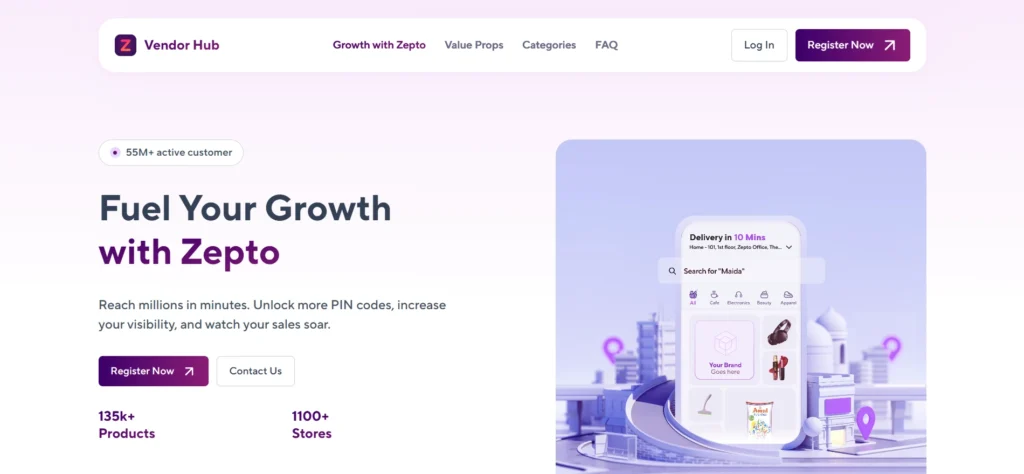
Registering on Zepto is a structured onboarding process designed for verified brands, distributors, and FMCG sellers looking to enter quick commerce.
You start by sharing your business details through Zepto’s official seller onboarding channel and completing initial eligibility screening.
Once submitted, Zepto evaluates your brand based on category demand, product fit, and supply capability across its dark store network.
Step 1: Submit Your Business Details
You begin by entering company name, contact information, GST details, and category selection for initial review.
Step 2: Upload Required Documents
You provide GST certificate, PAN card, bank details, and product compliance documents for verification.
Step 3: Product & Category Evaluation
Zepto checks your product demand, pricing suitability, and delivery feasibility across target locations.
Step 4: Commercial Alignment
If shortlisted, pricing margins, supply terms, and operational expectations are discussed with your team.
Step 5: Final Approval Process
Once approved, your products are mapped to relevant dark stores for fulfillment readiness.
Step 6: Go Live on Zepto
Your listings are activated, allowing customers to order your products directly through the app.
Zepto follows a controlled onboarding model, so approval depends heavily on category demand and operational readiness.
How to Register as a Seller on Blinkit?
Blinkit follows a curated seller onboarding model where brands are added based on demand density, category fit, and supply reliability across specific cities.
Unlike Zepto, Blinkit is tightly integrated with its dark store network under its parent quick commerce ecosystem, so onboarding is more city and category-specific.
Your application is reviewed based on product demand in active Blinkit locations rather than a general nationwide listing approach.
Here is the complete Blinkit seller registration process:
Step 1: Apply Through Blinkit Seller Portal
You begin by submitting your business details through Blinkit’s official seller onboarding form.
Step 2: Share Category and Business Information
You provide GST details, company profile, and select categories where your products fit existing demand clusters.
Step 3: Product Shortlisting Review
Blinkit evaluates whether your products match high-demand SKUs already performing in specific dark store regions.
Step 4: Supply Feasibility Check
Your ability to maintain consistent inventory across local warehouses is assessed before approval.
Step 5: Commercial Alignment
If shortlisted, Blinkit finalizes margins, pricing structure, and replenishment expectations with your team.
Step 6: Store Mapping & Integration
Approved products are mapped to relevant dark stores based on geographic demand patterns.
Step 7: Activation on Platform
Once integrated, your products go live in selected cities where supply and demand alignment is confirmed.
Blinkit onboarding is highly location-driven, meaning approval and scaling depend on city-level demand performance rather than uniform national rollout.
How to Set Up Your Product Listings on Zepto and Blinkit?
To successfully sell on Zepto and Blinkit, your product listings must be accurate, structured, and optimized for quick discovery.
Both platforms prioritize listings that are complete, correctly categorized, and ready for fast-moving inventory environments.
Key elements of a strong product listing:
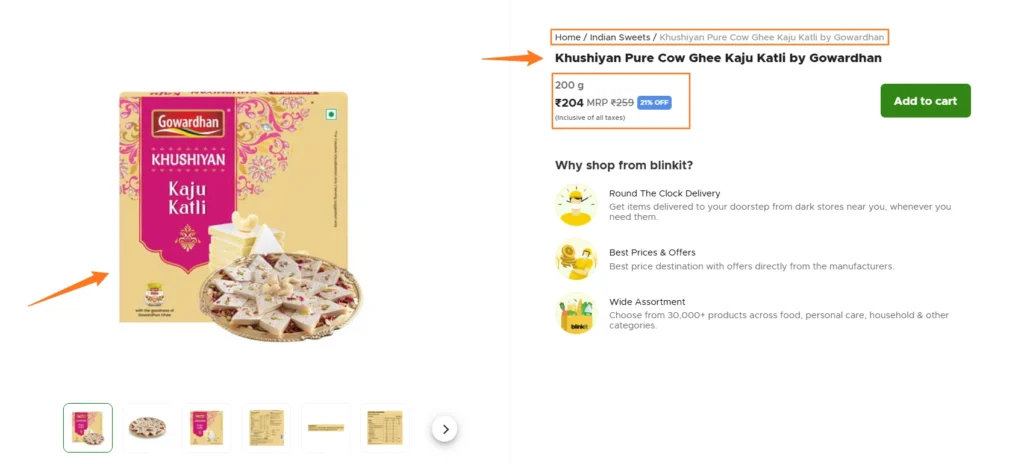
- Product Title Optimization: Use clear and searchable names that match how customers naturally search in quick commerce apps.
- Product Images: Upload high-quality, clean images that clearly represent the product without unnecessary background distractions.
- Category Selection: Assign products to the most relevant category to improve visibility in search and recommendation feeds.
- Pricing Accuracy: Ensure correct and consistent pricing across all SKUs to avoid rejection or listing delays.
- Stock Updates: Maintain real-time inventory accuracy to prevent out-of-stock issues and ranking drops.
- Product Description: Keep descriptions short, clear, and focused on key details like quantity, usage, and benefits.
How to upload products on Zepto and Blinkit:
Step 1: Log in to Seller Dashboard
Access your Zepto or Blinkit seller portal using your registered business credentials.
Step 2: Add New Product
Click on “Add Product” and enter essential details like name, category, and brand information.
Step 3: Upload Product Images
Add clear, high-quality images that represent the product accurately from multiple angles if required.
Step 4: Enter Pricing and Stock Details
Fill in MRP, selling price, and available inventory for each SKU.
Step 5: Select Correct Category
Choose the most relevant category to ensure proper placement in search and browsing results.
Step 6: Review and Submit
Double-check all details for accuracy and publish the listing to make it live on the platform.
Once published, your product becomes eligible for visibility across relevant dark store locations based on demand and availability.
Blinkit vs Zepto Fees & Commission Structure: What Sellers Should Know in 2026
Understanding Zepto and Blinkit fee structures is essential before setting pricing, as quick commerce directly impacts per-unit profitability.
Both platforms follow a variable cost model where commission, fulfillment, storage, and operational charges are deducted before seller payouts.
Zepto Commission & Fees (2026 Overview)
Zepto generally charges category-based commissions ranging from 3% to 20%, depending on product type and demand category.
Other core cost components include:
- Commission: 3%–20% depending on FMCG, groceries, personal care, and premium categories.
- Fulfillment Fee: Around ₹50–₹55 per unit for picking, packing, and delivery handling.
- Inwarding Fee: Around ₹5–₹6 per unit for warehouse processing and SKU handling.
- Storage Charges: ₹1–₹2 per unit per day for inventory holding in dark stores.
Zepto is optimized for fast inventory movement, so slow-selling products can quickly become margin-heavy due to storage and handling costs.
Blinkit Commission & Fees (2026 Overview)
Blinkit also follows a category-based commission model, typically ranging from 3% to 18% depending on product category and pricing slab.
Key cost elements include:
- Commission: 3%–18% based on category and product price range.
- Fulfillment Fee: ~₹50 per order covering picking, packing, and delivery.
- Inwarding Fee: ~₹5 per unit for warehouse intake and SKU scanning.
- Storage Charges: ₹1–₹1.5 per unit per day, depending on holding time.
- Other Costs: GST, TCS, and optional promotional or sponsored listing charges.
Blinkit works well for high-demand FMCG products, but fixed fulfillment costs can reduce margins on low-ticket or slow-moving SKUs.
What This Means for Sellers?
Both platforms typically reduce net margins by around 25%–40%, depending on product category, pricing, and inventory movement.
From a seller’s perspective, profitability on Zepto and Blinkit depends less on commission alone and more on:
- Fast inventory rotation
- Low storage dependency
- High-frequency purchase products
- Correct pricing after all deductions
A practical approach is to calculate net margin after all platform charges before onboarding any SKU. This ensures your quick commerce strategy remains profitable and scalable instead of volume-driven but margin-negative.
Managing Inventory and Operations After Going Live on Zepto and Blinkit
After your products go live on Zepto and Blinkit, inventory control becomes the main driver of sales continuity and platform visibility.
Both platforms run on real-time demand and hyperlocal stock availability, so even small stock gaps directly impact order flow.
Key inventory management areas for sellers:
- Real-Time Stock Sync: Keep inventory updated across all SKUs to avoid overselling and order cancellations.
- Fast SKU Replenishment: Refill high-selling products frequently based on dark store demand.
- Expiry Control: Follow FIFO to reduce wastage and ensure compliant shelf life for FMCG products.
- Stock Availability Tracking: Monitor fast-moving SKUs daily to avoid ranking drops due to stockouts.
- Return Monitoring: Track RTV cases and fix packaging or quality issues causing repeat returns.
- Pricing Accuracy: Maintain consistent pricing across SKUs to avoid suppression or listing issues.
Operational flow after going live:
- Order Monitoring: Track orders from seller dashboards to identify demand patterns by SKU and location.
- Inventory Dispatch: Send stock to dark stores based on demand forecasts, not reactive shortages.
- Category Manager Coordination: Align with platform teams for SKU performance updates and replenishment planning.
- Warehouse Compliance: Ensure correct barcodes, packaging, and documentation for smooth inwarding.
- SKU Optimization: Remove or adjust pricing of low-performing SKUs to reduce holding costs.
Success on Zepto and Blinkit depends on maintaining continuous availability of high-demand products rather than simply listing a large catalog.
How Zepto Ads and Blinkit Ads Can Accelerate Your Sales?
Zepto and Blinkit ads are performance-based placements that improve product visibility within high-intent shopping environments.
Both platforms use in-app advertising formats where users are already searching or browsing products, resulting in higher conversion rates compared to external digital ads.
Ad placements directly influence discoverability, ranking, and sales velocity in quick commerce ecosystems.
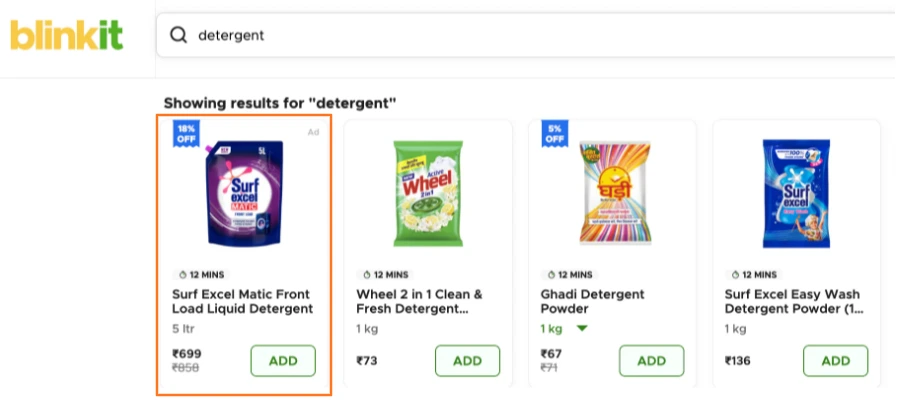
Key advertising formats on Zepto and Blinkit:
- Sponsored Product Ads: Appear in search results and category pages based on relevant keywords and user intent.
- Category Placement Ads: Display products within browsing categories to improve visibility among competing SKUs.
- Homepage Banner Ads: Premium placements for maximum reach during campaigns, launches, or seasonal demand spikes.
- Deal-Based Promotions: Highlight discounts, bundles, or limited-time offers to improve conversion rates.
This is how ads can impact your product’s performance:
- Improve product visibility in high-demand search queries.
- Increase SKU discoverability in competitive categories.
- Accelerate initial traction for new product listings.
- Improve conversion rates during peak shopping periods.
- Support faster inventory movement for high-stock SKUs.
Zepto and Blinkit advertising works best for FMCG, groceries, personal care, and high-frequency purchase categories where purchase decisions are made quickly.
Sellers typically use ads to stabilize ranking, increase visibility, and maintain consistent sales in competitive categories.
Also Read: 17 Best AI Tools for eCommerce that Automate Almost Everything
Conclusion
Selling on Zepto and Blinkit gives brands direct access to high-intent customers who prioritize instant delivery over traditional shopping timelines. The platform rewards sellers who maintain strong inventory control, accurate listings, and consistent replenishment across dark stores.
Success in quick commerce depends on operational discipline rather than just product availability. Brands that focus on fast-moving SKUs, correct pricing after deductions, and reliable supply cycles are able to scale faster and maintain stable visibility across both platforms.
As Zepto and Blinkit continue expanding their hyperlocal networks, competition will increase, but so will opportunity.
If you want to build a high quick commerce growth strategy and scale your brand efficiently, Codexxa can help you optimize listings, ads, and performance across both platforms. Contact us today!
FAQs
1. Is Zepto seller registration free?
Yes, Zepto seller registration is completely free for businesses, but sellers still need valid GST, PAN, and business documents. There are no upfront onboarding charges, but operational fees apply after you start selling products.
2. Do I need a GST number to sell on Zepto and Blinkit?
Yes, a GST number is mandatory for selling on both Zepto and Blinkit. Without GST registration, you cannot onboard as a seller because both platforms require tax-compliant invoicing and regulated business documentation.
3. Can a D2C brand without a physical store sell on Zepto or Blinkit?
Yes, D2C brands can sell without a physical store. You only need a registered business, proper warehouse or fulfillment setup, and the ability to maintain inventory for fast replenishment across dark stores.
4. How long does it take to go live on Zepto and Blinkit?
Onboarding typically takes 20–45 days, depending on documentation, category approval, and verification process. Delays usually happen if documents, product listings, or compliance requirements are incomplete.
5. Can I sell on both Zepto and Blinkit at the same time?
Yes, you can sell on both platforms simultaneously. Many brands do this to maximize reach, but you must manage separate inventory flows, pricing strategies, and platform-specific operational requirements.
6. How much does it cost to run ads on Blinkit and Zepto?
Ad costs vary based on category, competition, and visibility goals. Typically, brands start with budgets ranging from ₹25,000 to ₹50,000 per month, scaling higher during campaigns and peak seasonal demand.