

Ultimate SEO Checklist for Ecommerce Websites in 2026
Running an ecommerce website without SEO is like opening a store in a hidden location. No matter how good your products are, customers will not find you unless your site is optimized for search engines.
With increasing competition, rising ad costs, and changing search algorithms, ecommerce SEO has become more important than ever. Many online stores struggle with low organic traffic, poor product page rankings, indexing issues, and weak visibility for high-intent keywords.
That is exactly where a structured SEO checklist helps.
In this blog, you will find a complete and practical SEO checklist for ecommerce websites. It covers technical SEO, on-page optimization, product and category page SEO, content strategy, and conversion-focused improvements to help you increase rankings, traffic, and sales.
Let’s check it out!
What is E-commerce SEO?
E-commerce SEO is the process of optimizing an online store so that its product pages, category pages, and content rank higher in search engine results. The main goal here is to attract users who are actively searching for products you sell and convert that traffic into sales.
Unlike regular websites, ecommerce platforms deal with hundreds or even thousands of pages. These include product variations, filters, categories, and dynamic URLs. Without proper SEO, search engines may struggle to crawl, index, and rank these pages correctly.
E-commerce SEO focuses on improving visibility for high-intent searches such as product names, category keywords, and buyer-focused queries. It combines technical SEO, on-page optimization, content strategy, and user experience improvements to help search engines and users understand your store better.
When done right, ecommerce SEO helps your website appear at the right time in front of the right audience. This leads to consistent organic traffic, lower dependency on paid ads, higher trust, and better long-term revenue growth for your online business.
E-commerce SEO Checklist: 25+ Checklist To Follow Today
Having an ecommerce website is only the first step. However, to actually utilize it to see significant growth, you need a structured SEO checklist that enhances visibility, traffic, and conversions.
Below, we break down the most important ecommerce SEO checklists you should follow today to optimize your store from the ground up.
Basic SEO Checklist for E-commerce Website
Before moving on to advanced optimizations, these basic SEO setups ensure your ecommerce website is visible, trackable, and technically ready to grow through organic search.
1. Set Up Google Search Console
Google Search Console is a free tool from Google that shows how your ecommerce website appears in search results. It helps you understand which pages are indexed, what keywords trigger impressions, and whether Google faces any issues while crawling your site.
For ecommerce websites, this is especially important because product and category pages can silently fail to index, limiting visibility and traffic without obvious warning signs.
How to set it up:
- Go to Google Search Console and add your website
- Choose the Domain or URL Prefix option
- Verify ownership using DNS, HTML file, or tag
- Submit your XML sitemap after verification
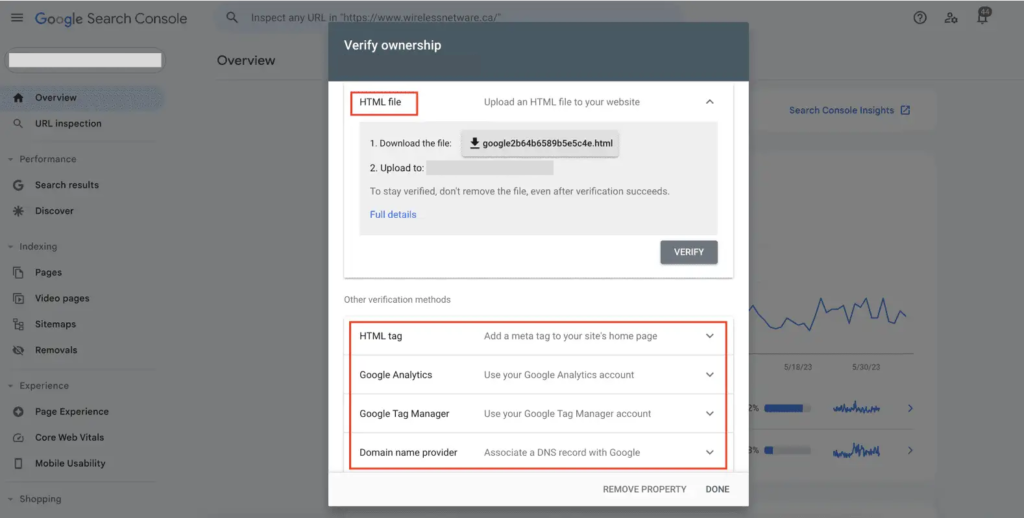
Once set up, Search Console allows you to track keyword performance, monitor indexing status of products, detect technical issues early, and identify pages that need SEO improvements.
2. Set Up Google Analytics Or GA4
Google Analytics helps you understand what users do after landing on your ecommerce website. While Search Console shows visibility, Google Analytics shows user behavior such as page views, add-to-cart actions, checkouts, and purchases.
This data is critical for ecommerce SEO because traffic alone does not matter unless it leads to conversions.
Here’s how to set up Google Analytics:
- Create a Google Analytics or GA4 property
- Add your website as a data stream
- Install the tracking code or connect via a tag manager
- Enable ecommerce and conversion tracking
After setup, you can measure how organic traffic performs, identify high-converting products, find drop-off points, and optimize pages that attract visitors but fail to convert.
3. Ensure Website Is Indexable
Indexability means search engines are allowed to crawl and store your ecommerce pages in their search index. If a page is not indexable, it will not appear in search results, regardless of content quality.
Many ecommerce websites accidentally block important pages due to noindex tags, robots.txt rules, or platform settings applied during development.
How to check if your website is indexable:
- Search ‘site:yourdomain.com’ on Google
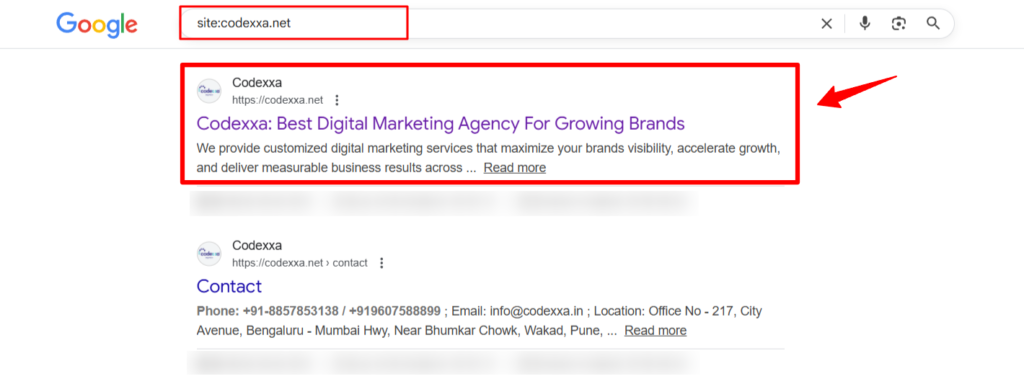
- Check if the key product and category pages appear
- Review page-level noindex settings
- Confirm robots.txt is not blocking important URLs
Ensuring your site is indexable allows Google to properly discover, crawl, and rank your ecommerce pages.
4. Fix Broken Pages And Redirect Errors
Broken pages negatively impact both user experience and SEO.
In ecommerce websites, these issues commonly occur when products are discontinued, URLs change, or categories are restructured.
When broken pages are left unresolved, users land on error pages, and search engines waste crawl budget on URLs that no longer exist.
Steps to fix broken pages and redirects:
- Identify broken URLs using Google Search Console or SEO tools (e.g., Ahrefs, SEMrush).
- Set up 301 redirects from removed pages to relevant products or categories.
- Redirect discontinued products to the closest alternative or parent category.
Fixing these broken pages and implementing proper redirects helps preserve existing SEO value, which will improve crawl efficiency, prevent user drop-offs, and maintain overall trust in your ecommerce website.
On-Page SEO Checklist for E-commerce Website
The following on-page SEO checklist covers the most important optimizations you should apply across product pages, category pages, and supporting content to improve rankings and conversions.
5. Perform Keyword Research For Buyer Intent
Keyword research is the backbone of e-commerce SEO because it determines whether your pages attract visitors who are ready to purchase or users who are only browsing. Targeting buyer-intent keywords ensures your products and categories appear when users are closer to making a decision.
For example, a search like “running shoes” reflects broad interest, whereas “men’s lightweight running shoes for daily training” signals high purchase intent. E-commerce SEO performs best when pages are built around these intent-driven searches rather than generic terms.
How to find buyer-intent keywords:
- Start with your core products and categories.
- Use keyword research tools (e.g. Ahrefs, Semrush, Google Keyword Planner) to identify long-tail and intent-based variations.
- Analyze top-ranking pages to understand whether the intent is transactional or informational.
- Map high-intent keywords to product and category pages.
6. Optimize Title And Meta Descriptions
Titles and meta descriptions play an important role in defining how your pages appear in search results and whether users will click on them or not. Even strong rankings can underperform if these elements fail to communicate relevance and value.
For ecommerce pages, well-optimized titles and descriptions set clear expectations, highlight benefits, and differentiate your listing from competitors, directly improving click-through rates and organic traffic performance.

7. Use Proper H1 And H2 Heading Structure
Heading structure helps search engines understand the hierarchy and focus of your content while improving readability for users.
The H1 establishes the primary topic, and H2 headings organize supporting sections.
On ecommerce pages, disciplined heading usage strengthens keyword relevance, improves content clarity, and ensures important sections such as descriptions, features, and FAQs are correctly interpreted by search engines.
8. Create SEO-Friendly URL Structures
SEO-friendly URLs communicate page relevance instantly to both users and search engines, making them easier to crawl, trust, and rank.
Example of a good URL:
https://example.com/mens-running-shoes
Example of a poor URL:
https://example.com/product?id=12345&type=shoes
To create SEO-friendly URLs:
- Keep URLs concise and readable.
- Include relevant keywords naturally.
- Avoid unnecessary parameters and symbols.
- Maintain a logical category and product hierarchy.
Maintaining proper URLs supports long-term ranking stability and improves both crawl efficiency and user confidence.
9. Strengthen Internal Linking Across Pages
Internal linking plays a critical role in distributing authority across your ecommerce website and guiding users toward relevant products and categories. It also helps search engines identify which pages carry the most authority.
Ways to improve internal linking:
- Link category pages to priority and high-performing products.
- Add contextual links from blogs to relevant products and categories.
- Ensure important pages are accessible within a few clicks from the homepage.
- Use descriptive anchor text that reflects page context.
10. Optimize Images With Alt Text And Compression
Images heavily influence ecommerce performance, but oversized or unoptimized files can slow down pages and harm user experience. Image compression reduces file size while maintaining visual quality, directly improving load times.
Alt text provides search engines with context about what an image represents and improves accessibility for users relying on screen readers. Accurate alt text also enhances visibility in image search results.
To optimize images effectively, compress files using tools or plugins such as TinyPNG, ShortPixel, or built-in ecommerce platform optimizers, and write descriptive alt text that clearly explains the product without keyword stuffing.
Off-Page SEO Checklist for E-commerce Website
Off-page SEO helps your ecommerce website build authority, build trust in users’ minds, and maintain credibility in the eyes of search engines by strengthening signals that exist beyond your own site.
The following Off-page SEO checklist highlights the most important actions you should focus on:
11. Build High-Quality Backlinks
Backlinks are one of the strongest ranking signals in SEO.
When reputable websites link to your ecommerce store, search engines interpret this as a vote of trust, which directly impacts rankings.
For ecommerce websites, quality matters far more than quantity. A few links from relevant industry blogs, publications, or authoritative resources carry significantly more value than dozens of low-quality links.
Focus on earning links from websites related to your products, industry, or audience. This strengthens topical authority and helps product and category pages compete in search results where competition is high.
12. Analyze Competitor Backlink Profiles
Your competitors’ backlink profiles reveal exactly what is helping them rank. By analyzing where their links come from, you can identify opportunities you may be missing.
This process helps you understand which content attracts links, which publications mention competitors, and what type of links are more valuable in your niche.
How to approach competitor backlink analysis:
- Identify top-ranking competitors for your target keywords.
- Use SEO tools to review their backlink sources.
- Look for patterns such as blogs, directories, or media mentions.
- Prioritize link opportunities that are relevant and realistic.
Learning from competitors allows you to build a smarter, more targeted backlink strategy instead of guessing what might work.
13. Earn Brand Mentions And PR Links
Brand mentions occur when other websites talk about your business, products, or expertise, with or without a direct link. Search engines increasingly treat these mentions as trust signals.
For ecommerce brands, PR links from news sites, industry publications, and authoritative blogs significantly strengthen brand credibility and domain authority.
You can earn these mentions by launching unique products, sharing original data, collaborating with creators, or contributing expert insights to publications. Over time, these brand mentions help your ecommerce site build long-term authority and stronger organic visibility.
Content, Product & Categories SEO Checklist for E-commerce Website
This checklist focuses on how your products, categories, and supporting content work together to improve visibility, attract high-intent traffic, and guide users toward conversions.
14. Write Unique Product Descriptions
Unique product descriptions help search engines differentiate your pages from competitors and prevent duplicate content issues, which are common in ecommerce. Many stores rely on manufacturer-provided descriptions, which results in identical content across multiple websites.
But good descriptions explain the product’s value, use cases, and benefits in your own brand voice. This not only improves rankings but also builds trust and reduces hesitation for buyers who need clarity before making a purchase.
15. Optimize Product Titles For Search Intent
Product titles should reflect how customers actually search, not just internal product names or SKUs. Search engines rely heavily on titles to understand relevance for transactional queries.
Including key attributes such as product type, material, audience, or use case helps your listings appear for high-intent searches. Optimized titles also improve click-through rates because users can instantly confirm relevance from search results.
16. Create SEO-Optimized Category Pages
Category pages often drive more organic traffic than individual product pages because they target broader, high-volume keywords. However, many ecommerce sites under-optimize these pages.
An effective category page includes a heading, a description that explains what users will find, and internal links to relevant products. This helps search engines understand the page topic and helps users navigate products more efficiently.
17. Add FAQs To Product And Category Pages
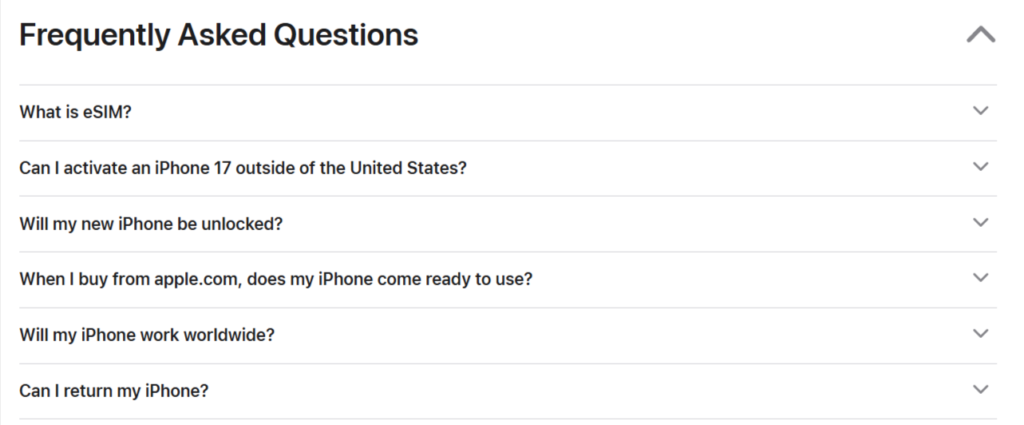
FAQs address common questions that often block conversions, such as sizing, compatibility, shipping, or returns. Adding FAQs directly to product and category pages reduces friction and keeps users from leaving the site to find answers elsewhere.
From an SEO perspective, FAQs help capture long-tail and question-based searches while improving content depth and relevance on key revenue-driving pages.
18. Publish Buying Guides And Comparisons
Buying guides and comparison content help users who are still evaluating options before making a purchase. These pages are especially valuable for products that require research or consideration.
Guides such as “How to Choose,” “Best For,” or comparison articles allow your ecommerce site to rank for informational and commercial queries while naturally guiding users toward relevant products and categories.

19. Build Topic Clusters Around Core Categories
Topic clusters organize content around a central category or theme, supported by related blogs, guides, or product pages. This helps search engines recognize your authority within a specific product area/niche.
By linking supporting content back to category and product pages, topic clusters strengthen relevance, improve internal linking, and increase the likelihood of ranking for competitive keywords across the entire category.
Local SEO Checklist for E-commerce Website
Local SEO helps ecommerce businesses strengthen visibility, credibility, and trust in location-based searches, and the following checklist outlines the key actions you should take to improve local presence and attract high-intent customers.
20. Set Up Google Business Profile
Google Business Profile allows your ecommerce business to appear in local search results and Google Maps when users search for your brand or related products nearby. Even ecommerce-only brands benefit from this visibility because it strengthens credibility and brand trust.
How to set it up:
- Visit Google Business Profile and add your business.
- Enter your business name, category, and service area.
- Add accurate address, contact details, and website URL.
- Verify ownership through phone, email, or postcard.
- Optimize the profile with images, description, and business hours.
Once set up, a complete and verified profile improves visibility in local searches, supports branded queries, and reinforces trust for users evaluating your ecommerce business.
21. Maintain NAP Consistency Across Platforms
NAP stands for Name, Address, and Phone number. Consistency of this information across your website, Google Business Profile, and online directories is a strong trust signal for search engines.
Inconsistent details confuse both users and search engines, which can negatively impact local rankings. Maintaining uniform NAP information helps search engines confidently associate your business with a specific location and improves local visibility.
22. Collect And Manage Customer Reviews
Customer reviews influence both purchasing decisions and local search rankings. Search engines treat reviews as indicators of trust, relevance, and business legitimacy.
Encouraging genuine reviews from satisfied customers and responding to them regularly helps build credibility and improve engagement. For ecommerce businesses, reviews also reduce hesitation for first-time buyers who rely on social proof before purchasing.
23. Create Location-Specific Landing Pages
If your ecommerce business serves multiple cities or regions, location-specific landing pages help you rank for local searches more effectively. These pages allow you to tailor content to specific areas without creating separate websites.
Each location page should include relevant service or product information, local context, and clear contact details. This approach improves relevance for location-based queries and helps attract users searching for products available in their area.
Technical SEO Checklist for E-commerce Website
Technical SEO strengthens website security, speed, and crawlability to support stable ecommerce rankings, and the following checklist highlights the key technical actions you should prioritize.
24. Ensure HTTPS And Website Security
HTTPS secures data exchanged between users and your website, which is especially critical for ecommerce stores handling logins, payments, and personal information. Search engines treat HTTPS as a trust and ranking signal, and users are far less likely to engage with non-secure sites.
To ensure proper security, your website should have a valid SSL certificate, all pages should load over HTTPS, and mixed-content issues should be resolved. A secure website builds user confidence, reduces bounce rates, and supports stronger search visibility.
25. Improve Core Web Vitals Performance
Core Web Vitals are performance metrics used by search engines to measure real-world user experience related to loading speed, interactivity, and visual stability.
A slow or unstable website increases abandonment, while strong performance keeps users engaged through browsing and checkout.
Important Core Web Vitals benchmarks ecommerce websites should aim for:
- Largest Contentful Paint (LCP) under 2.5 seconds
- Interaction To Next Paint (INP) under 200 milliseconds
- Cumulative Layout Shift (CLS) below 0.1
Improving these metrics results in faster load times, smoother interactions, and a more reliable shopping experience.
26. Optimize XML Sitemap And Robots.txt
An XML sitemap helps search engines discover important pages such as products and categories, while robots.txt controls which pages search engines are allowed to crawl.
You can access and optimize these using:
- Your XML sitemap is usually available at ‘yourdomain.com/sitemap.xml’.
- Submit the sitemap through Google Search Console.
- Review robots.txt at ‘yourdomain.com/robots.txt’.
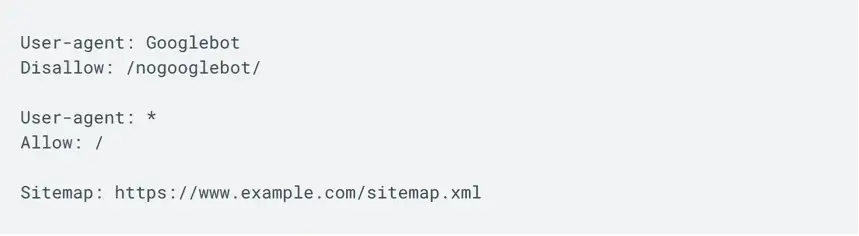
- Allow crawling of product and category pages.
- Block low-value pages, such as filters or internal search URLs.
Properly configured sitemaps and robots.txt files ensure search engines focus on revenue-driving pages instead of wasting crawl budget.
27. Fix Crawling And Indexing Issues
Crawling issues occur when search engines cannot access pages, while indexing issues happen when pages are crawled but not stored in search results. These problems are common in ecommerce websites with large catalogs and frequent updates.
Regularly reviewing crawl and index reports helps identify blocked pages, server errors, or duplicate URLs. Fixing these issues ensures your products and categories remain discoverable, eligible to rank, and consistently visible in search results.
Advanced SEO Checklist for E-commerce Website
Advanced SEO focuses on improving how your ecommerce website appears in enhanced search results, AI-driven search experiences, and performance tracking, and the following checklist highlights actions that help you stay competitive as search continues to evolve.
28. Implement Structured Data And Schema Markup
Structured data, also known as schema markup, helps search engines better understand the content and context of your pages. For ecommerce websites, this includes details such as product prices, availability, reviews, ratings, and breadcrumbs.
When schema is implemented correctly, your listings can appear with rich results in search, such as star ratings, price ranges, and stock status, which improves visibility and click-through rates.
To implement schema effectively:
- Use product schema for prices, availability, and reviews.
- Add breadcrumb schema for category navigation.
- Validate structured data using Google’s Rich Results Test.
- Fix any schema errors or warnings reported.
Schema markup does not guarantee higher rankings, but it significantly improves how your ecommerce pages are displayed and interpreted in search results.
29. Optimize For Featured Snippets And AI Overviews
Search engines increasingly surface answers directly within search results through featured snippets and AI-powered overviews. Ecommerce websites that structure content clearly are more likely to appear in these positions.
Optimizing for these placements involves answering common questions directly, using clear headings, and structuring content in a way that search engines can easily extract key information.
To improve visibility in featured snippets and AI-driven results:
- Answer buyer questions within FAQs and guides.
- Use concise explanations under clear headings.
- Structure content with lists and short paragraphs.
- Ensure information is accurate, updated, and helpful.
Appearing in these enhanced results increases brand visibility, authority, and trust, even when users do not immediately click through.
30. Track SEO Performance And Conversion Metrics
SEO success should always be measured beyond rankings. For ecommerce websites, performance tracking helps you understand whether traffic is translating into engagement and revenue.
Tracking the right metrics allows you to identify what is working, what needs improvement, and where to focus future SEO efforts.
Key metrics to monitor regularly:
- Organic traffic and keyword visibility
- Product and category page conversions
- Bounce rates and engagement metrics
- Revenue generated from organic search
Consistent tracking ensures your SEO strategy remains data-driven, scalable, and aligned with business growth goals.
Conclusion: Is This E-commerce SEO Checklist Enough To Rank?
This checklist gives you everything you need to build a strong e-commerce SEO foundation, but ranking is never about checklists alone. It is about how well your website serves users at every step of their buying journey.
Search engines exist to help people discover products, answers, and solutions quickly. Ecommerce websites that make this process easier through properly structured, helpful content, and reliable performance naturally earn visibility.
To stay competitive, e-commerce SEO should be treated as an ongoing process. Applying this checklist regularly and refining it with expert insight can help your store grow sustainably in organic search.
Need expert help? Codexxa’s ecommerce SEO specialists can turn this checklist into a growth strategy that improves rankings, traffic, and sales for your online store.
Add Comment