

Conversion Rate Optimization Checklist: 25+ Actionable Steps to Increase Conversions in 2026
Driving traffic has become easier with modern SEO and paid media strategies. But, converting that traffic into qualified leads or revenue, however, remains the biggest growth challenge for most businesses today.
Many brands invest heavily in acquisition channels but overlook performance gaps within their own websites.
Conversion Rate Optimization (CRO) focuses on improving how users experience and respond to existing marketing assets. Instead of increasing spend, CRO helps extract greater value from traffic you already earn.
When implemented strategically, CRO identifies behavioral drop-offs, removes decision barriers, and strengthens conversion intent across critical touchpoints such as landing pages, forms, and ecommerce funnels.
Therefore, in this guide, we’ll walk you through a 25+ conversion rate optimization checklist you can follow to identify conversion gaps, prioritize high-impact improvements, and make data-driven decisions that directly influence revenue growth and marketing efficiency.
Let’s check it out!
What is Conversion Rate Optimization (CRO)?
Conversion Rate Optimization (CRO) is the practice of improving how effectively your website turns visitors into leads or customers by removing friction, improving clarity, and guiding users toward action.
Most websites do not fail because of low traffic. They fail because visitors hesitate, get confused, or lose trust before completing an action that initially brought them to the page.
CRO focuses on understanding real user behavior. It analyzes where users scroll, pause, abandon forms, or exit pages, then improves those moments to make decisions easier and faster.
Instead of redesigning entire websites, CRO improves critical conversion elements such as value propositions, CTAs, layouts, trust signals, and user flow based on measurable performance data.
Why CRO matters for modern businesses:
- Higher ROI from existing SEO and paid traffic.
- Lower customer acquisition cost over time.
- Better lead quality and stronger buying intent.
- Scalable growth without constantly increasing ad budgets.
In simple terms, CRO ensures your marketing efforts do not stop at attracting visitors but continue until those visitors confidently take the action your business depends on.
25+ Conversion Rate Optimization (CRO) Checklist To Follow Today
Conversion improvements do not happen by chance. They come from identifying exactly where users hesitate, lose confidence, or abandon actions.
This conversion rate optimization checklist is built to help you evaluate your business impact the way users actually experience it, so every improvement you make directly supports stronger decisions and measurable growth outcomes.
Landing Page Optimization Checklist
Landing pages influence conversion rates more than any other acquisition asset. Most pages convert only a small fraction of visitors, so optimizing them is critical to growth. Websites often convert between 2%–5% on average, meaning 95% of traffic may leave without action.
The following landing page optimizations focus on removing friction, increasing relevance, and strengthening decision confidence at crucial conversion moments. So, this is what you need to know:
1. Define Single Conversion Goal Per Page
Webpages with a focus conversion outperform those with multiple competing actions. When visitors encounter too many choices, decision friction increases and conversions decrease.
According to industry observations, 48% of landing pages include more than one offer — a common reason for diluted impact.
To combat this, you can audit each landing page and remove secondary CTAs that compete with your primary goal. This simplifies decision-making and clarifies purpose, both essential for moving users from passive browsing to meaningful engagement.
2. Strengthen Hero Section
Visitors decide within seconds whether a landing page is worth their attention. Research suggests 90% of visitors who read your headline will also read your CTA, making the hero section or “above-the-fold” more vital.
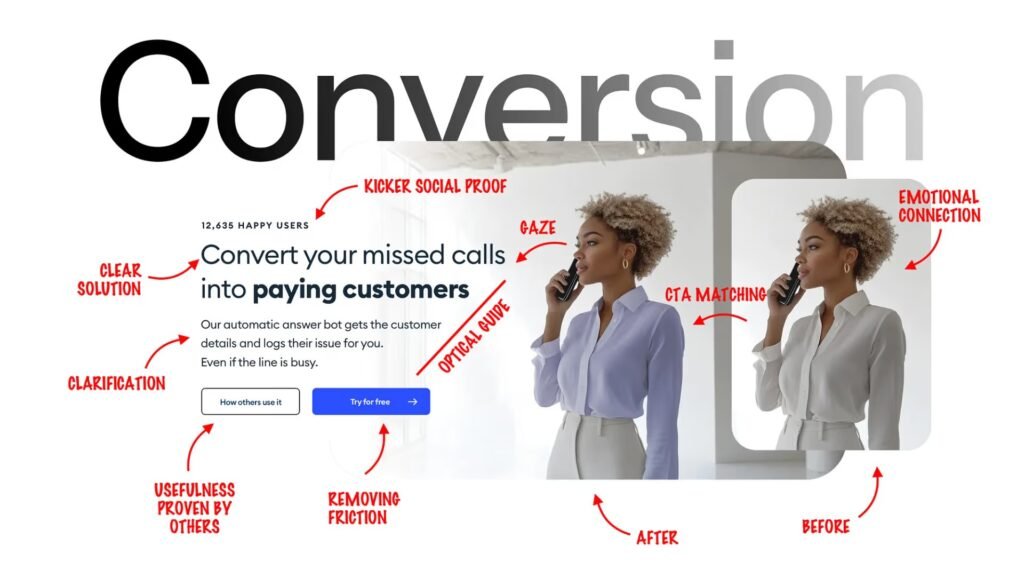
Therefore, your hero section must answer:
- Who benefits from the offer?
- What value does it deliver?
- Why should users act now?
By using specific outcomes rather than generic claims (e.g., “Increase leads by 30% in 60 days”), messaging immediately becomes clear, bounce rates drop, and conversions improve overall.
3. Match Messaging With Traffic Intent
Message mismatch is a top conversion killer. Landing pages that do not mirror the promise made in an ad or search result often fail to retain intent momentum.
Landing page optimization aligns user expectations with page content, improving relevance and trust. Continual refinement of messaging based on visitor behavior is a core CRO strategy.
Optimize by:
- Mirroring campaign keywords.
- Reflecting pain points targeted in ads.
- Preserving offer continuity from conversion entry.
4. Remove Navigation Distractions
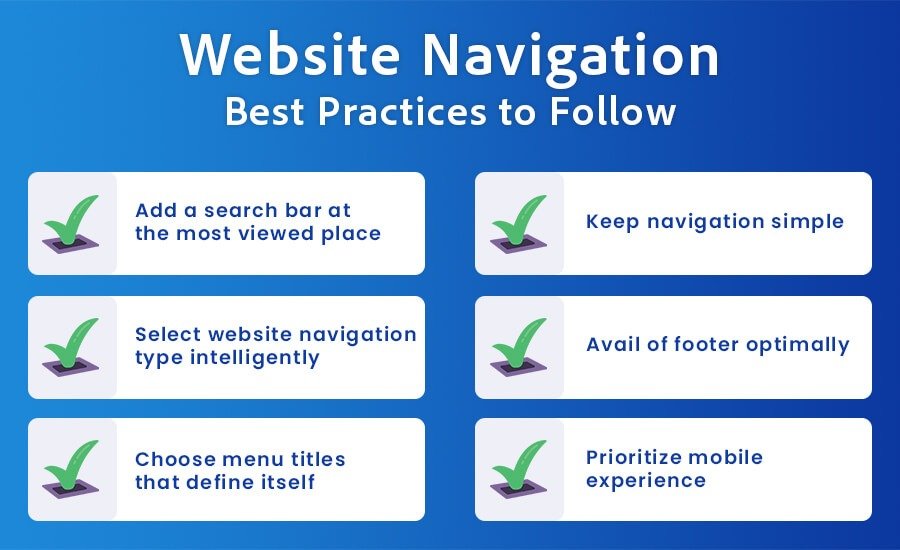
Conversion-focused pages should minimize elements that lead users away from action. Every link becomes a potential exit point during critical decision moments.
Industry benchmarks show pages with fewer distractions and fewer navigation options typically outperform unfocused pages, increasing completion likelihood.
Remove unnecessary menus, link clusters, and unrelated pathways so users remain oriented toward the main CTA.
5. Test Multiple Hero Section Variations
Hero sections often carry disproportionate influence over conversion performance. A/B testing across variations of headlines, visuals, and CTAs can reveal which combinations resonate best with your audience.
Studies show that A/B testing landing page designs can increase conversions by up to 12% versus untested pages.
So, test variables such as:
- Value proposition phrasing
- Static vs contextual visuals
- Strong CTA variants
- Headline framing styles
A structured A/B testing approach can transform the hero section into a measurable performance by making a few changes specific to audiences of different interests.
Call-To-Action Optimization Checklist
Calls-to-action directly control conversion outcomes. Even minor improvements in CTA clarity, placement, or phrasing can produce measurable lifts without changing traffic volume.
Here are some of the CTA optimizations you can implement to increase the conversion rates:
6. Use Action-Focused CTA Copy
Generic CTAs like “Submit” or “Click Here” reduce motivation because they lack outcome clarity. Users respond better when they understand what happens after clicking.
Research shows personalized CTAs convert 202% better than basic versions because they align with visitor intent and perceived benefit.
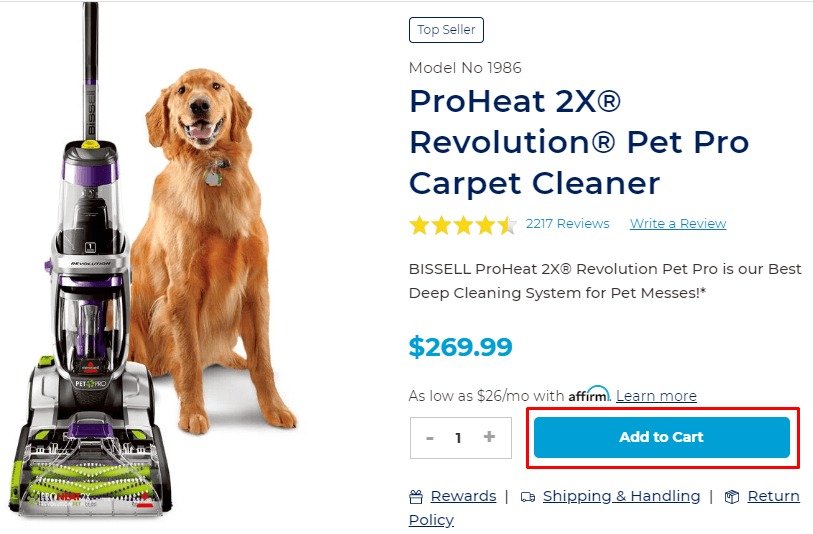
Instead of vague commands, use outcome-driven phrasing such as “Get My Free Audit,” “Start My 14-Day Trial,” or “Download The Checklist.”
Action-focused copy increases perceived ownership and reinforces the value exchange, making users more comfortable taking the next step.
7. Increase CTA Visibility And Contrast
CTAs must visually stand out from surrounding elements. If users struggle to identify the primary action quickly, conversion probability declines.
Improving button design and visibility significantly impacts interaction behavior, as users naturally focus on visually dominant clickable elements.
Effective CTA visibility includes:
- High-contrast button colors
- Adequate white space
- Clear size hierarchy
- Mobile-friendly tap areas
When the CTA is immediately visible without scanning, engagement improves, and friction decreases.
8. Add Sticky CTAs On High-Intent Pages
High-intent pages such as pricing, product details, or service pages benefit from persistent CTAs that remain visible during scrolling.
Persistent call-to-action placements reduce the effort required to act. Users do not need to scroll back upward to convert.
Sticky elements are especially effective on mobile devices, where screen space is limited, and user attention fluctuates. By strategically placing sticky CTAs, it can enhance the conversion opportunities that can be accessible at the moment intent peaks.
9. Add Microcopy To Reduce Friction
CTA hesitation often stems from uncertainty. Microcopy placed near buttons reduces anxiety by clarifying what happens next.
Examples include short trust-based reassurances such as:
- “No Credit Card Required”
- “Takes Less Than 60 Seconds”
- “Free, No Obligation”
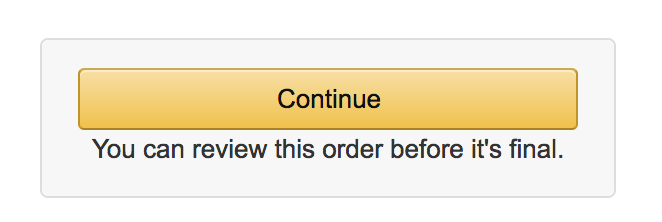
Behavioral research consistently shows that reducing uncertainty increases completion rates because users feel safer proceeding. Adding microcopy, it removes silent objections before interrupting the decision process.
10. A/B Test CTA Copy And Placement
Even high-performing CTAs should be tested. Small variations in wording, size, positioning, or surrounding elements can significantly change outcomes.
Test one variable at a time, measure their significant results statistically, and scale winning versions systematically. By doing this structured experimentation, it can transform CTAs from design assumptions into predictable performance drivers.
Form Optimization Checklist
Forms represent the final conversion barrier where intent either converts or disappears. Even motivated users abandon submissions when effort feels excessive, unclear, or risky during completion.
According to FormStory, only about 71% of users complete forms successfully, meaning nearly one-third abandon despite already showing strong conversion intent.
So, here are some practical CRO practices you can follow:
11. Reduce Form Fields To Essentials Only
Long forms increase perceived effort immediately. According to WPForms, reducing fields from four to three alone can increase conversions by nearly 50%.
Every additional question introduces hesitation. Ask only information required to move the user forward, then collect deeper qualification data later through onboarding or CRM enrichment.
Prioritize fields that directly influence sales conversations. Removing optional questions often produces faster completion and higher-quality submissions because users feel less commitment pressure.
12. Enable Autofill And Smart Inputs
Typing friction is a major abandonment trigger, especially on mobile devices. According to Zuko, users using browser autofill complete forms at a 71% rate compared to 59% without autofill.
Autofill reduces typing time and prevents formatting mistakes that interrupt progress. Faster completion creates momentum, which psychologically encourages users to finish submissions.
Enable browser autofill compatibility, automatic address detection, and smart formatting for phone and email fields to reduce manual effort and accelerate completion speed.
13. Add Inline Validation And Error Prompts
Late error messages frustrate users and increase abandonment. From UX testing insights shared by Baymard Institute, unclear validation feedback is a common checkout usability failure.
Inline validation allows users to correct mistakes instantly instead of restarting the process after submission failure.
Show field-specific guidance immediately beside inputs. Real-time correction maintains interaction flow and prevents frustration that often causes users to exit before completing the form.
14. Convert Long Forms Into Multi-Step Forms
Large forms appear overwhelming even when the completion time is short. According to HubSpot data, multi-step forms can achieve conversion rates up to 86% higher when information is grouped logically.
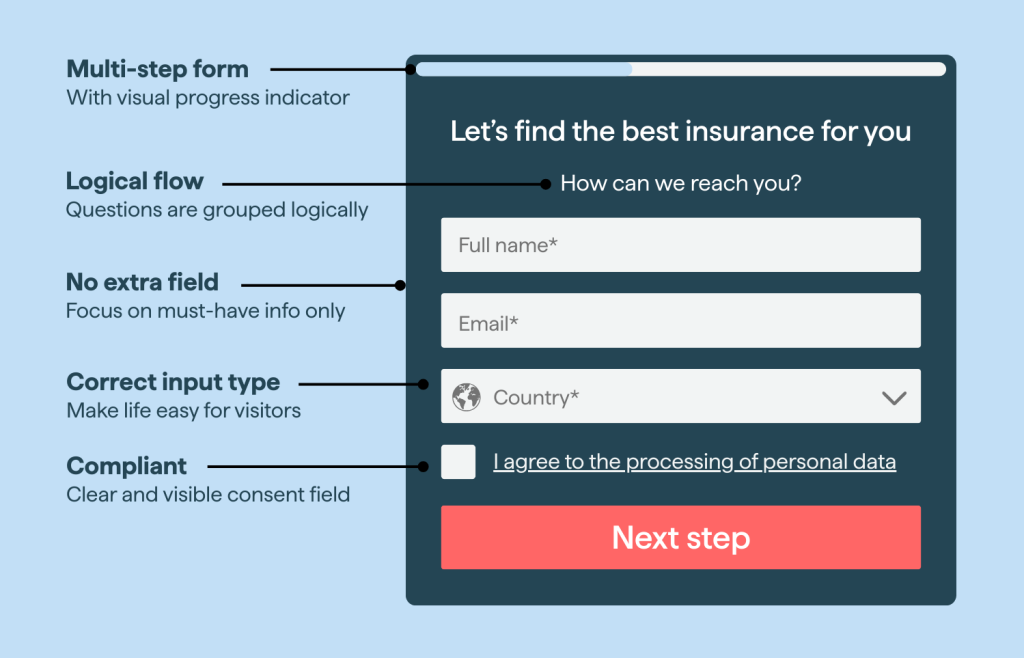
Breaking forms into steps creates perceived progress, reducing psychological resistance while keeping users engaged through smaller commitments.
Start with low-effort questions first, then gradually request deeper details. Early completion creates momentum that increases the likelihood of finishing later steps.
15. Add Trust Signals Near Submission Buttons
Submission hesitation often comes from privacy concerns rather than effort. Users frequently abandon forms due to uncertainty around data usage. Place reassurance messaging directly near submission buttons, such as privacy guarantees, security badges, or short trust statements.
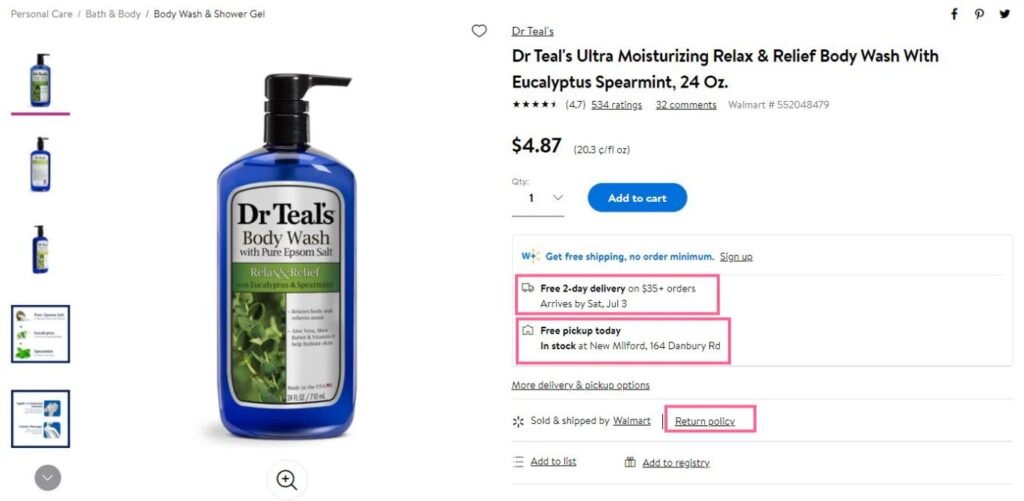
By putting trust signals positioned at the decision moment reduce perceived risk and help users feel confident sharing personal information required for conversion.
E-commerce Conversion Optimization Checklist
E-commerce conversions rarely fail because of product demand. Most losses happen during the evaluation and checkout stages, where user friction points, hidden costs, or trust gaps interrupt buying momentum.
According to Baymard Institute, the average cart abandonment rate is 70.22%, which means seven out of ten shoppers leave after adding products, creating massive recoverable revenue opportunities.
So, here are some e-commerce CRO practices you can implement:
16. Simplify Checkout Flow
Complex checkout experiences create friction during the highest intent moment. And, simplifying checkout design alone can increase conversions by up to 35%.
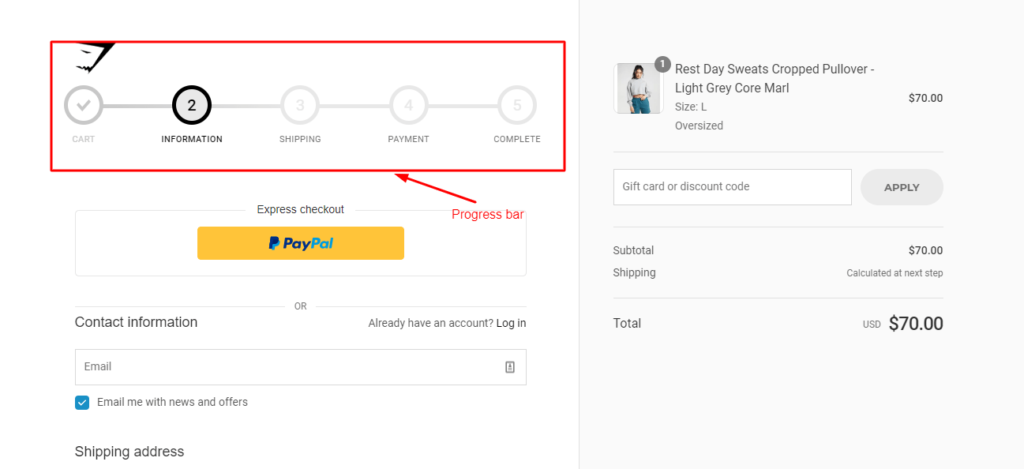
Removing unnecessary steps, reducing page reloads, and avoiding forced account creation are some steps to combating it. Also, a streamlined checkout keeps users focused on completing payment instead of reconsidering their purchase decision.
Here, you can consider using a progress indicator to minimize distractions. Clear progression reassures users they are close to completion, reducing abandonment caused by uncertainty about remaining steps.
17. Enable Guest Checkout
Forced account creation interrupts purchase momentum. Around 26% of users abandon checkout when required to create an account before purchasing.
Allow guest checkout first, then offer account creation after purchase confirmation. Post-purchase registration feels optional rather than mandatory, improving completion rates significantly.
Position account benefits subtly (order tracking, faster checkout later) instead of blocking transactions. Removing commitment pressure helps users prioritize finishing the purchase.
18. Display Transparent Pricing Early
Unexpected costs remain the primary abandonment trigger.
Around 48% of shoppers abandon purchases because extra fees, such as shipping or taxes, appear too late. Which means showing shipping estimates, taxes, and total pricing before checkout can build transparency and prevent negative impact during final payment.
19. Add Reviews On Product Pages
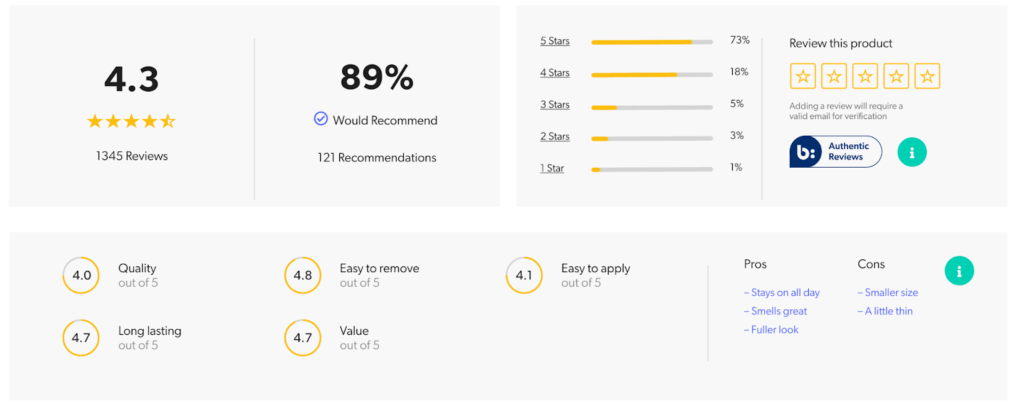
Social proof reduces perceived purchase risk. Products with over 50+ reviews experience approximately 37% higher conversion rates compared to low-review products.
Displaying ratings near product titles and including photo reviews helps shoppers confirm product quality faster without leaving the page. Feature both positive and critical feedback. Balanced reviews increase authenticity and improve buyer confidence more than perfectly curated testimonials.
20. Show Product Images And Videos
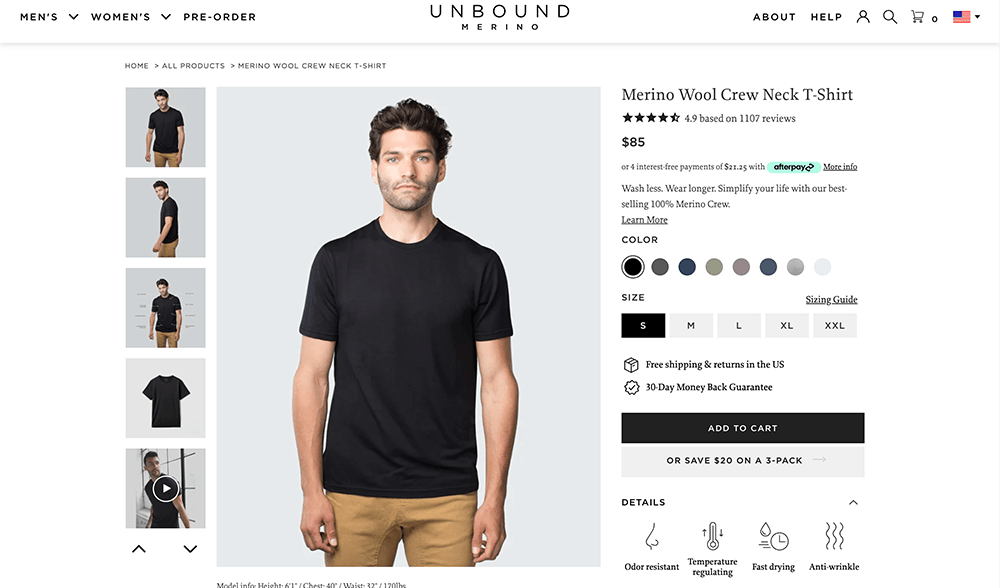
Visual uncertainty delays purchase decisions. 74% of shoppers are more likely to buy after watching product videos demonstrating real usage or outcomes.
Include zoom features and multiple viewing angles. Detailed visualization replaces physical inspection and strengthens purchase confidence during online evaluation.
21. Trigger Exit-Intent Offers
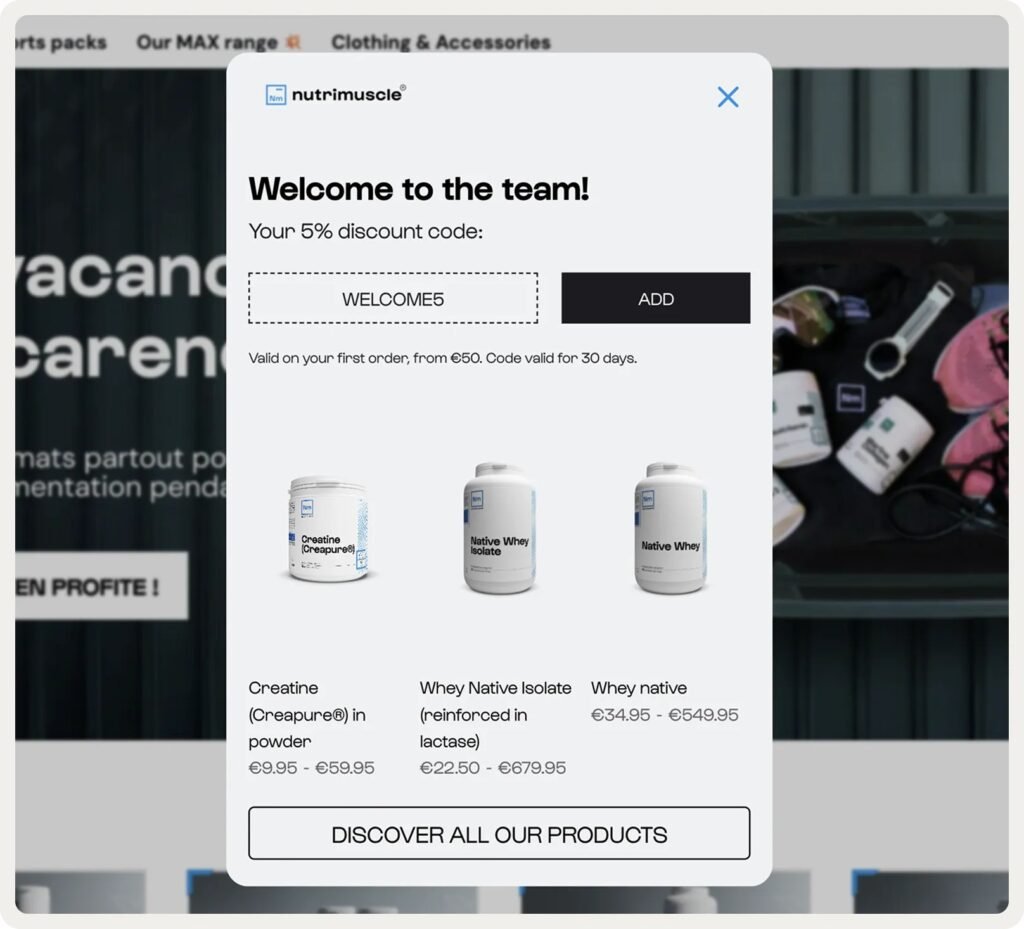
Many abandoning users still have buying intent. Exit-intent campaigns recover conversions by presenting incentives precisely when users attempt to leave the checkout or cart page.
Use contextual offers such as limited discounts, free shipping reminders, or bundle upgrades (for example, “Complete purchase now and get 10% off”).
Timing matters more than discount size. Properly targeted exit offers recover otherwise lost revenue without reducing perceived product value.
22. Display Personalized Product Recommendations
Relevant recommendations increase order value and engagement. Showing personalized recommendations can increase upto 4.5% conversions from the stores that don’t.
Showing related products on product pages, carts, and checkout stages (for example, accessories matching viewed items) can effortlessly reduce decision effort while encouraging additional purchases.
Recommendations work best when behavior-based rather than generic ones. Using browsing history and cart context creates relevance that feels helpful instead of promotional.
Also Check: Ultimate SEO Checklist for E-commerce Websites in 2026
User Experience Optimization Checklist
User experience determines whether visitors continue exploring or leave within seconds. Poor usability silently reduces conversions even when traffic quality, messaging, and offers are already strong.
Improving user experience can increase your conversion rates by up to 400%, making UX one of the highest-impact CRO investment areas. So, here’s a practical UX CRO checklist to focus on:
23. Improve Visual Hierarchy
Users scan pages instead of reading them fully. Therefore, keeping a clear navigation and a structured layout can improve task success rates by up to 40%.
Strong hierarchy guides attention naturally toward headlines, proof elements, and CTAs without forcing users to search for information.
You can improve hierarchy using:
- Larger headline contrast.
- Logical spacing between sections.
- Consistent typography scaling.
When users instantly understand where to look next, decision speed improves significantly.
24. Reduce Cognitive Load
Complex layouts often increase the mental effort and slow down decisions.
To reduce the cognitive load, you can simplify pages by limiting the number of choices, grouping related information, and removing unnecessary visuals. Every additional decision increases hesitation during the conversion journey.
Focus each section on one purpose only. This will allow users to process value faster and move confidently toward conversion actions.
25. Optimize Mobile Experience
Mobile usability directly affects revenue outcomes. According to Baymard Institute, most e-commerce mobile experiences still perform at only “mediocre” usability levels.
Mobile users face smaller screens, touch limitations, and shorter attention spans. Therefore, their Interfaces must prioritize speed, clarity, and thumb-friendly interaction patterns.
Key mobile improvements include:
- Larger tap targets
- Sticky CTAs
- Simplified navigation menus
- Faster loading interactions
Mobile optimization removes interaction friction where abandonment risk is highest.
26. Add Sticky Offer Bars
Users often decide to act after scrolling deeper into content. Sticky bars keep offers visible without forcing users to scroll back upward to convert.
Persistent visibility improves action timing because users can convert immediately when intent peaks rather than searching for conversion buttons again.
Use sticky elements for limited offers, consultation CTAs, or discounts. Continuous visibility strengthens conversion opportunities without interrupting browsing flow.
27. Embed Social Proof Feeds
Real-time social signals increase credibility during evaluation. An improved UX flow design can reduce bounce rates by 10–15% by encouraging continued interaction.
Embedding Instagram feeds, live purchases, or customer activity creates dynamic validation that reinforces trust without adding promotional pressure. Creating this authentic activity signals to visitors feel confident that others actively engage with the brand, reducing customers’ trust before making a purchase.
Trust And Credibility Optimization Checklist
By strengthening trust and credibility signals, websites can significantly improve conversions. According to Baymard, optimized trust elements can improve conversion rates by up to 35% while reducing purchase decisions and abandonment rates. Here are practical trust and credibility CRO practices you can implement.
28. Add Verified Customer Testimonials
Displaying customer reviews can increase conversion rates by up to 190% for lower-priced products and nearly 380% for higher-priced purchases.
Testimonials work best when they answer real objections (like delivery time, results, reliability). Add customer names, photos, or company roles to make the proof believable rather than promotional.
Example placements that perform well:
- Near pricing sections
- Beside CTAs
- Inside comparison sections
29. Showcase Client Logos
Visitors borrow trust from brands they already recognize. Around 92% of consumers trust recommendations or endorsements more than direct brand messaging.
A simple logo strip communicates experience faster than paragraphs of explanation. Use recognizable clients or “As Seen On” mentions near hero sections or proposal entry points.
30. Display Security And Payment Badges
Trust badges reduce purchase anxiety instantly. Adding recognized security badges can increase conversions by 12.2% and transactions by over 14%.
Place badges exactly where risk appears:
- Checkout payment area
- Lead form submission buttons
- Pricing confirmation sections
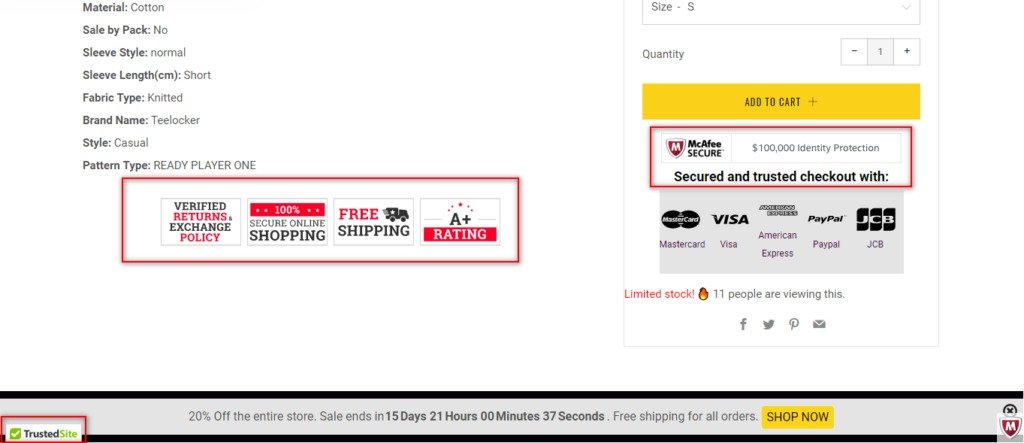
Visibility at decision moments matters more than badge quantity.
31. Add Clear Refund And Guarantee Policies
By putting security and guarantee assurances, conversions can increase by up to 32–42%, depending on placement and clarity.
Write guarantees in easy-to-read language, like:
- “30-Day Money-Back Guarantee”
- “Cancel Anytime”
- “Full Refund If Unsatisfied”
By showing promises clearly, you can reduce perceived downside and remove customers’ hesitation.
32. Add FAQ Section On Key Pages
Unanswered doubts can delay action. But, by adding FAQs on key pages (important pages), you can significantly increase your purchase decisions because of clarified concerns.
High-converting FAQs focus on objections, and you can create FAQs on things like:
- Pricing
- Delivery timelines
- Support availability
Answering doubts on the page prevents users from leaving for competitors.
Data And Experimentation CRO Checklist
Websites improve when decisions follow data, not assumptions. Businesses operating with structured experimentation consistently outperform competitors, with data-driven teams achieving up to 23 times stronger customer acquisition performance.
Therefore, these are some data-backed CRO practices you can use to turn insights into measurable conversion growth:
33. Tracking Funnel Drop-Off Points
Most conversion loss happens at transition moments (across key pages like pricing, cart, etc.) rather than across entire pages. Funnel tracking exposes exactly where intent weakens, so optimization focuses on real friction instead of guesswork.
Fixing one broken step often produces higher conversions than redesigning the entire experience.
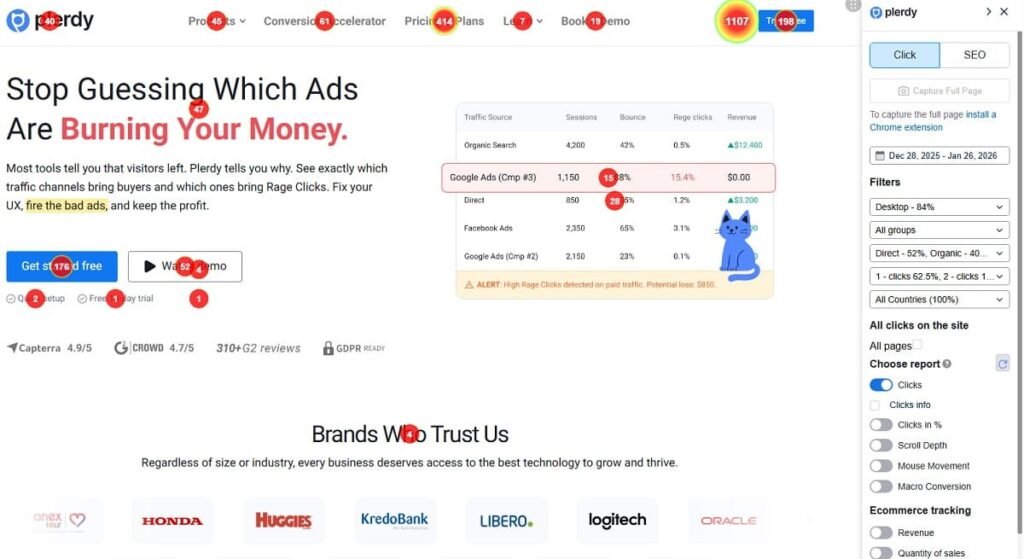
34. Use Heatmaps And Session Recordings
Numbers explain performance, but behavior explains decisions. Click maps and session recordings reveal confusion patterns such as rage clicks, ignored CTAs, or repeated scrolling without interaction.
These patterns expose usability problems invisible inside analytics dashboards, allowing teams to prioritize fixes based on observed friction rather than assumptions.
35. Capture Emails With Contextual Popups
Popup performance typically depends on timing, not presence. Average pop-up conversions sit near 3%, while behavior-triggered campaigns regularly exceed 9% when aligned with user intent.
Effective triggers include:
- Exit intent detection
- Scroll depth engagement
- Repeat visitor behavior
Relevance transforms pop-ups from interruption into real-time assistance.
36. Launch Gamified Campaigns
Providing interactive experiences to users typically outperforms passive promotions because users participate instead of observing. Engagement rates often double when offers involve quizzes, rewards, or progress-based incentives.
Examples that work well:
- Spin-to-win discounts
- Product recommendation quizzes
- Limited unlock rewards
37. Add Live Chat And Contact Options
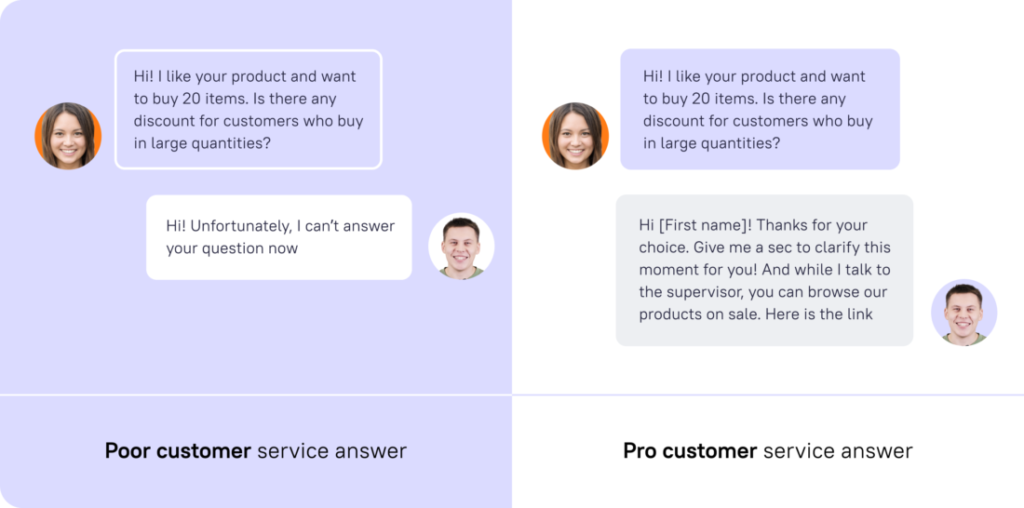
Unanswered questions delay purchases. Adding real-time chat interactions can increase conversions by roughly 20% because users’ hesitation disappears once uncertainty is resolved instantly.
Best placement areas where you can add Live Chat or Contact options are:
- Onto pricing comparison
- Checkout process
- Service selection pages
By making use of these conversion rate optimization practices, it works best when implemented consistently, not individually. Small improvements across multiple touchpoints can compound over time, creating measurable gains in conversions, revenue, and overall marketing performance.
Conclusion
Across industries, average website conversion rates still sit near 2–3%, which means most traffic never becomes revenue. But businesses that optimize experiences systematically can unlock significant growth without increasing acquisition costs.
Conversion rate optimization works because it improves decisions already happening on your website. Small changes across landing pages, forms, messaging, and trust signals can compound into measurable performance over time.
Instead of chasing more traffic, think of CRO as a continuous improvement system to reveal insights, and then use it to uncover hidden revenue opportunities already present within your current traffic and marketing investments.
Need help optimizing your business as per best CRO practices? At Codexxa, we’ve helped more than 100+ businesses implement an industry-leading CRO checklist. Contact us to get help from an expert today!
Add Comment