

Ecommerce SEO Audit: 13 Points That Make It the Right Way
Is your e-commerce SEO not delivering results even after continuous optimization, content updates, and technical fixes across your website?
Many e-commerce stores keep investing in SEO but still struggle with stagnant rankings, low traffic, and poor conversions due to hidden structural and technical issues.
43% of ecommerce traffic comes from organic search, which means SEO gaps directly reduce your store’s visibility, customer acquisition, and revenue potential.
Let’s check how you can perform a quick ecommerce SEO audit that identifies hidden roadblocks stopping your store from generating consistent traffic and sales.
What Is an Ecommerce SEO Audit?
An ecommerce SEO audit is a structured evaluation process that identifies issues preventing your online store from ranking, attracting traffic, and converting users effectively.
It goes beyond basic checks and analyzes technical SEO, site architecture, content relevance, keyword targeting, and user experience, impacting search visibility and performance.
Instead of guessing what’s wrong, an SEO audit provides clarity on where your store is losing traffic, how competitors outperform you, and what to fix first.
Core areas covered in an ecommerce SEO audit:
| Area | What It Evaluates |
| Technical SEO | Crawlability, speed, and indexation issues |
| Site Structure | Navigation, URL hierarchy, internal linking |
| Content & Keywords | Relevance, intent match, and duplication issues |
| UX & Conversion | Engagement signals affecting rankings |
| Authority | Backlinks, trust, and domain strength |
By conducting a proper ecommerce SEO audit, it prioritizes actions that can directly improve rankings, traffic quality, and revenue outcomes.
When Should You Do an Ecommerce SEO Audit?
Most e-commerce websites constantly evolve with new products, categories, and updates, which gradually introduce hidden SEO issues affecting rankings and performance.
If your traffic drops, rankings fluctuate, or conversions decline, it usually signals deeper technical, structural, or content issues requiring immediate audit intervention.
SEO audits should be performed every 3 to 6 months for active ecommerce stores to maintain performance, competitiveness, and consistent organic growth.
Situations where an audit becomes critical:
- After website redesign, migration, or platform changes.
- When adding large product catalogs or expanding categories.
- When competitors start outranking your key product pages.
- Before scaling SEO or increasing paid marketing budgets.
Ignoring SEO audits may allow issues to compound over time, reducing visibility, weakening rankings, and directly limiting your ecommerce store’s growth potential.
Also Check: Ultimate SEO Checklist for Ecommerce Websites in 2026
13 Points to Do an Ecommerce SEO Audit the Right Way
Many ecommerce stores keep fixing visible issues while deeper problems remain unnoticed, limiting growth despite ongoing SEO efforts and consistent optimization work.
Without a clear audit approach, teams often spend time on low-impact fixes instead of resolving issues that actually influence visibility and conversions.
Here are the key areas of an ecommerce SEO audit you need to evaluate to understand what’s working, what’s blocking performance, and where improvements should begin:
1. Crawlability and indexation check
2. Site architecture and URL structure optimization
3. Technical SEO health audit
4. Keyword mapping and search intent alignment
5. Category page SEO optimization
6. Product page SEO audit
7. Duplicate content and cannibalization fixes
8. Internal linking and crawl depth optimization
9. On-page SEO signals audit
10. Content strategy audit
11. Backlink profile and authority audit
12. Conversion and UX signals analysis
13. Tracking, analytics, and continuous optimization
Now, let’s go through each of these points to understand how they impact your ecommerce SEO performance and what actions you should take.
1. Crawlability & Indexation Check
If search engines cannot access or index your pages, your products will never appear in search results, regardless of optimization efforts.
Search engines allocate limited crawling resources to each website, meaning not every page gets discovered or indexed automatically.
For large ecommerce stores with thousands of URLs, inefficient crawling can leave important product pages undiscovered while low-value pages consume crawl activity.
How to identify crawl and indexation issues:
- Check the “Pages” report in Google Search Console to compare indexed, excluded, and discovered but not indexed URLs.
- Review crawl stats to identify spikes in errors, redirects, or unnecessary URL crawling.
- Analyze sitemap coverage to ensure only important pages are submitted and indexed.
How to fix and optimize crawl efficiency:
| Action | Why It Matters |
| Block low-value URLs | Prevents filters, parameters, and duplicates from wasting crawl activity |
| Fix broken links | Ensures crawlers reach valid, indexable pages |
| Optimize internal linking | Helps search engines discover important pages faster |
| Clean XML sitemap | Guides crawlers toward priority pages only |
| Improve server response | Faster sites allow more pages to be crawled efficiently |
If your crawl activity is wasted on duplicate or irrelevant URLs, important pages may never get indexed or ranked effectively.
Therefore, focus on guiding search engines toward high-value pages so your products are discovered faster, indexed correctly, and shown for relevant searches.
2. Site Architecture & URL Structure Optimization
A disorganized ecommerce setup makes it difficult for users to navigate and prevents search engines from understanding how your pages connect.
Search engines use internal linking patterns to discover new product pages and assign importance, directly influencing which pages get visibility in results.
A well-planned hierarchy ensures your key pages are easier to find, helping improve discoverability and increasing their chances of ranking.
How to evaluate your site structure:
- Check if users can reach key pages within three to four clicks from the homepage.
- Ensure categories follow a logical hierarchy from broad to specific.
- Identify orphan pages that are not linked internally from any category or navigation.
What an optimized structure should look like:
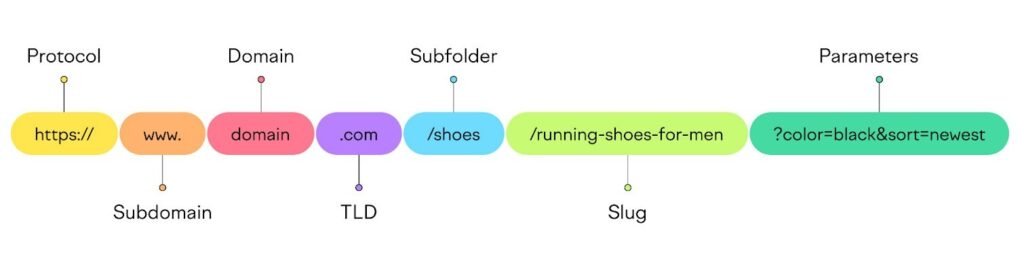
URL structure best practices:
| Good Example | Bad Example |
| /store/shoes/running/nike-air | /product?id=12345&ref=abc |
| /store/mens/tshirts/black-cotton | /category.php?page=2&sort=price |
Clean URLs improve clarity, help search engines understand page context, and support stronger rankings across category and product pages.
If hierarchy is unclear, search engines struggle to interpret relevance, which reduces the visibility of important pages in competitive search results.
3. Technical SEO Health Audit
Technical SEO determines whether your ecommerce store performs fast, loads smoothly, and delivers a seamless experience across devices and user interactions.
Even minor technical issues can silently reduce rankings, increase bounce rates, and negatively impact how users interact with your product and category pages.
A 1-second delay in page load time can reduce conversions by 7%, directly impacting revenue and overall ecommerce performance.
Key areas you need to evaluate:
- Page speed and load performance across mobile and desktop devices.
- Core Web Vitals, including LCP, INP, and CLS performance metrics.
| Metric | Ideal Benchmark |
| Page Load Time | Under 2 seconds |
| LCP (Largest Contentful Paint) | Below 2.5 seconds |
| INP (Interaction to Next Paint) | Below 200 milliseconds |
| CLS (Cumulative Layout Shift) | Below 0.1 |
- Broken links, redirect chains, and server response errors.
- Mobile usability and responsiveness across different screen sizes.
Common fixes that improve performance:
- Compress large images and use modern formats like WebP.
- Enable caching and use a content delivery network for faster loading.
- Minify CSS, JavaScript, and remove unused code.
- Reduce server response time and optimize hosting performance.
If your website feels slow or unstable, users leave quickly, sending negative signals that weaken your search visibility over time.
4. Keyword Mapping & Search Intent Alignment
Many ecommerce pages fail to rank because they target incorrect keywords, mismatched intent, or compete internally with similar pages.
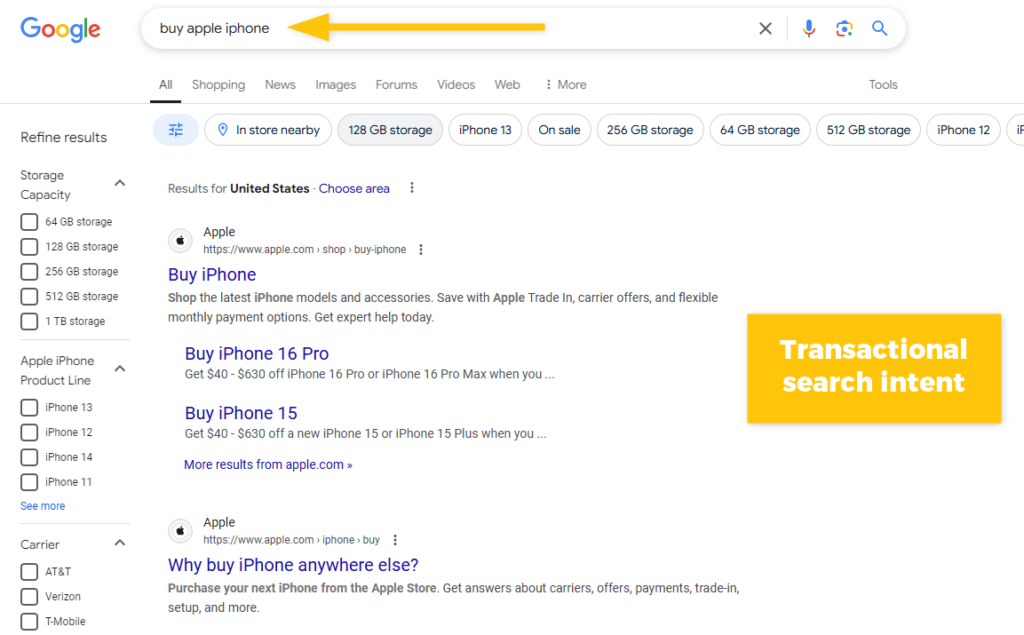
Keyword mapping assigns specific search terms to relevant pages, ensuring each page targets a clear purpose and avoids internal competition.
When multiple pages target the same keyword, search engines struggle to decide which one to rank, reducing overall visibility.
How to audit keyword mapping effectively:
- Check if each page targets one primary keyword aligned with its purpose.
- Identify pages competing for the same keyword across categories or products.
- Analyze whether content matches informational, commercial, or transactional search intent.
What proper keyword mapping looks like:
| Page Type | Keyword Intent | For Example |
| Category Page | Commercial | “running shoes for men” |
| Product Page | Transactional | “buy nike air zoom pegasus” |
| Blog Content | Informational | “best running shoes for beginners” |
50% of search queries contain four or more words, highlighting the importance of targeting specific long-tail keywords for better conversions.
Fixing keyword alignment improves clarity, prevents cannibalization, and helps search engines understand exactly which page should rank for each query.
5. Category Page SEO Optimization
Category pages often rank for high-intent searches because users explore options before choosing specific products, making them critical for driving qualified traffic.
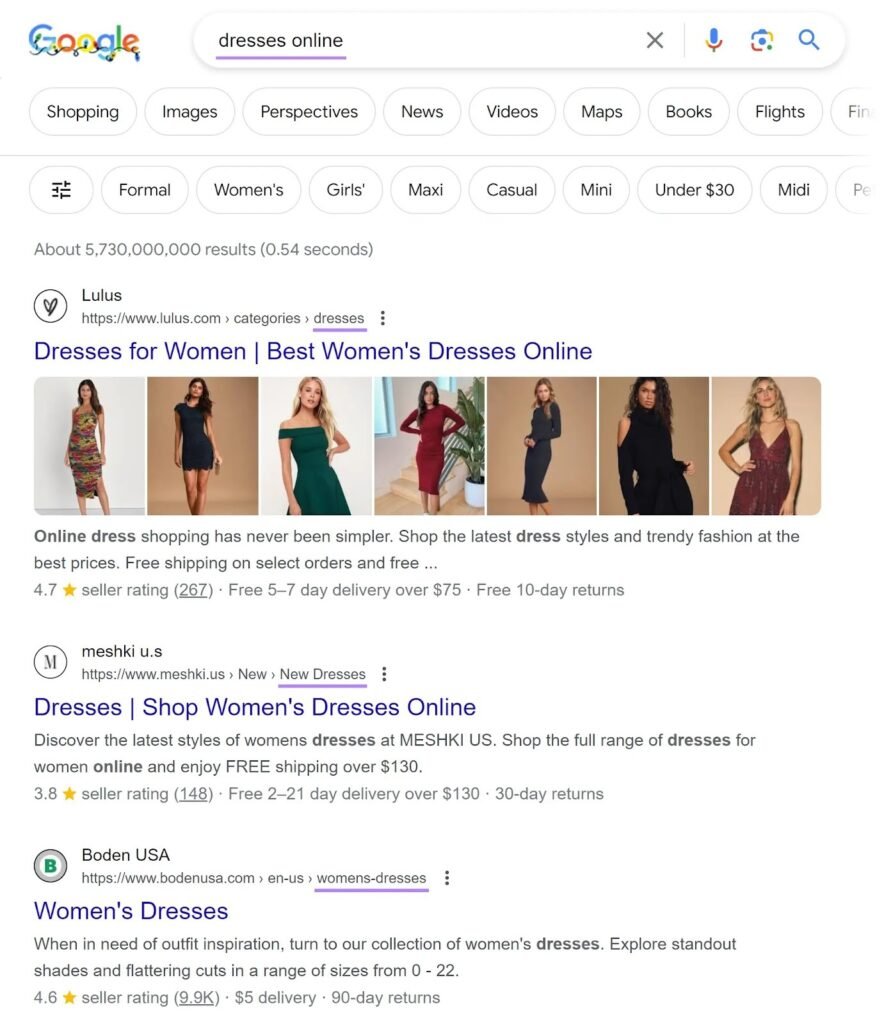
Up to 70% of ecommerce sales begin on category pages, highlighting their direct influence on product discovery and purchase decisions.
How to audit category page performance:
- Check if category titles match real search queries instead of internal naming conventions.
- Review content depth to ensure it helps users compare options and make informed decisions.
- Analyze filter behavior to prevent duplicate URLs and indexing issues.
High-impact improvements you should implement:
| Optimization Areas | Action to Take |
| Search Alignment | Use commercial keywords matching buyer intent |
| Content Layer | Add helpful descriptions, FAQs, and buying context |
| Filtering Logic | Control indexing for parameter-based URLs |
| Internal Linking | Connect categories with subcategories and products |
Well-optimized category pages act as decision-making hubs, guiding users efficiently while signaling relevance and authority to search engines. If these pages lack clarity or intent alignment, users struggle to navigate, reducing engagement and limiting your store’s organic growth potential.
6. Product Page SEO Audit
Product pages directly influence purchase decisions, making them critical for both visibility and conversions within your ecommerce SEO strategy.
83% of shoppers abandon purchases when product information is incomplete, showing how critical detailed and accurate product pages are for conversions.
What to evaluate on product pages:
- Check if product descriptions are unique instead of copied from manufacturers.
- Ensure titles include product-specific keywords matching real buying searches.
- Verify images load fast and include descriptive alt text for accessibility and SEO.
- Review structured data implementation for product details, pricing, and reviews.
High-impact improvements you should implement:
- Add benefit-driven descriptions that explain real usage instead of listing generic specifications.
- Include customer reviews and ratings to build trust and improve engagement signals.
- Use FAQs to answer objections and capture long-tail search queries.
Product pages should reduce decision friction by providing clarity, trust signals, and complete information that helps users confidently move toward purchase.
7. Duplicate Content & Cannibalization Fixes
Duplicate content is a frequent ecommerce issue caused by filters, repeated descriptions, and multiple URLs showing nearly identical product or category pages.
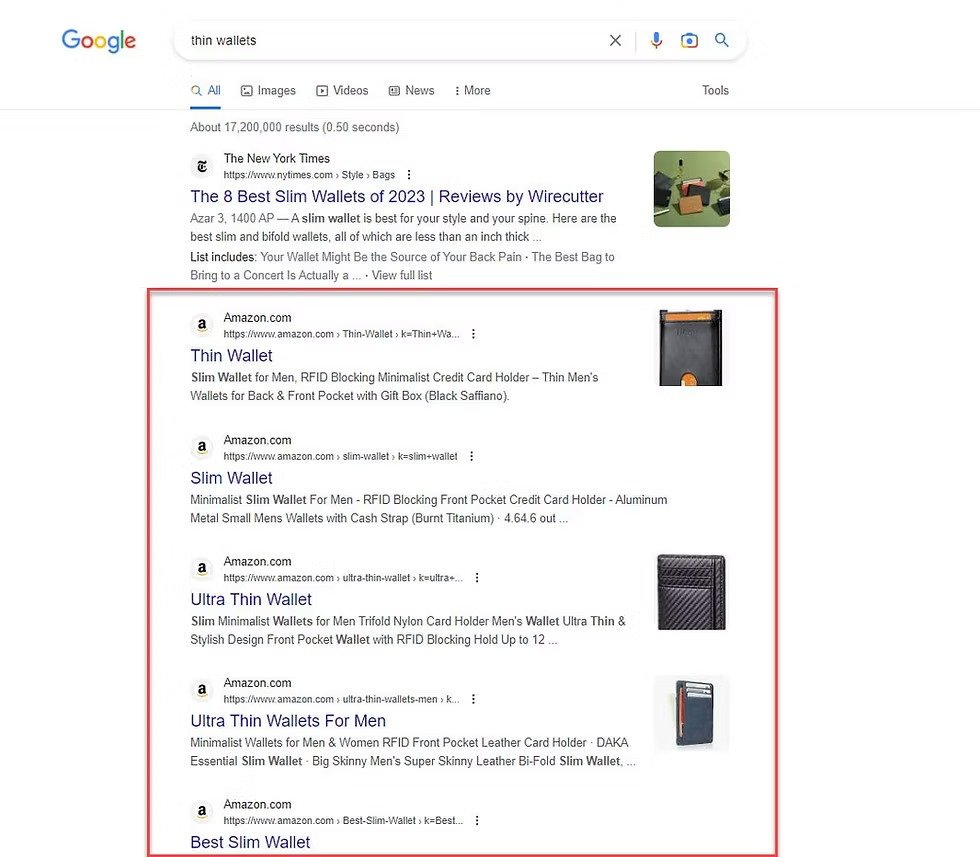
When similar pages exist, search engines cannot clearly determine which version should rank, weakening visibility and splitting ranking signals.
Nearly 29% of websites face duplicate content issues, making it a widespread problem that directly impacts search performance and discoverability.
Where duplicate issues usually come from:
- URL parameters created by filters, sorting, or pagination.
- Same product listed under multiple categories with different URLs.
- Copied manufacturer descriptions reused across product listings.
How to identify duplication efficiently:
- Search exact text snippets in quotes to find repeated content across multiple pages.
- Use SEO tools to detect duplicate titles, meta descriptions, and similar content blocks.
- Check indexing reports to identify competing URLs targeting the same keywords.
Fixing duplication and cannibalization issues:
| Solution | When to Use |
| Canonical tags | When multiple URLs contain similar content |
| Noindex tags | For low-value or filtered pages |
| 301 redirects | When consolidating duplicate or outdated pages |
| Content rewriting | When pages share identical descriptions |
When multiple pages compete for the same query, search engines divide authority, reducing the ability of any single page to rank effectively.
Resolving duplication ensures search engines identify the correct page, improving clarity, strengthening rankings, and increasing overall ecommerce visibility.
8. Internal Linking & Crawl Depth Optimization
Many ecommerce pages remain undiscovered because they lack internal links, making it difficult for search engines to find and prioritize them.

Internal links help search engines discover pages, understand relationships, and distribute authority across your website, improving visibility and navigation flow.
Improving internal linking can increase indexed pages by up to 30%, helping search engines access deeper pages more efficiently.
What to check and improve:
- Ensure every important page has at least one internal link pointing to it.
- Identify orphan pages that are not connected within your site structure.
- Link high-authority pages to important category or product pages.
- Use descriptive anchor text that clearly explains the destination page.
- Add breadcrumb navigation to improve navigation and crawl pathways.
Strong internal linking improves discoverability, distributes authority, and helps search engines prioritize pages that drive traffic and conversions.
9. On-Page SEO Signals Audit
On-page SEO defines how clearly your pages communicate relevance to search engines, directly influencing rankings, visibility, and user engagement outcomes.
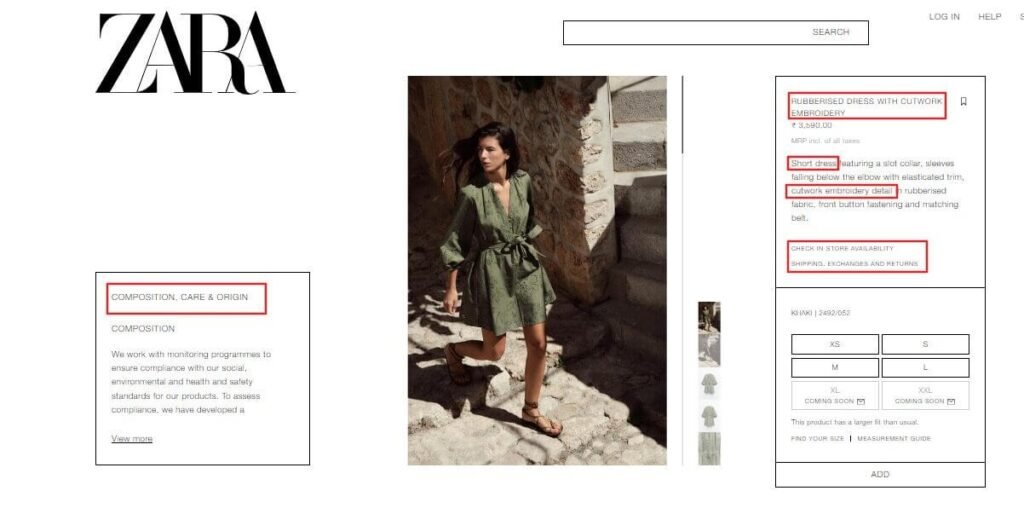
Even strong pages underperform when titles, headings, or content fail to match search intent or clearly communicate value to users.
Only 0.78% of users click results on the second page, making first-page optimization critical for capturing visibility and traffic.
What you should audit on every page:
| Element | What to Check |
| Title Tag | Clear keyword alignment with strong click intent |
| Meta Description | Compelling message that improves click-through rates |
| Headings | Logical hierarchy supporting content clarity |
| Content Quality | Useful, relevant, and aligned with user intent |
| Image SEO | Optimized alt text and compressed file sizes |
Quick actions that improve results:
- Rewrite titles to align with real search queries and improve click appeal.
- Enhance meta descriptions to clearly communicate value and intent.
- Structure content using headings that guide both users and search engines.
- Expand thin pages with meaningful information that helps users take action.
If your page fails to communicate relevance instantly, users skip it, reducing engagement signals and weakening ranking potential over time.
10. Content Strategy Audit
Many ecommerce websites fail to capture early-stage traffic because they lack supporting content that guides users before they reach product pages.
Here are some e-commerce content optimization to prioritize:
1. Meta titles and meta descriptions
These appear in search results and directly influence whether users click on your page or choose a competitor instead.
Ensure every page has unique titles and descriptions aligned with search intent and written to attract clicks.
Recommended limits:
- Meta title: 50–60 characters
- Meta description: Up to 155–160 characters
2. Broken links
Broken links lead users to non-existent pages, disrupting navigation and negatively affecting user experience and search engine trust.
Audit both internal and external links regularly to ensure all URLs are valid and accessible.
3. Content quality and brand consistency
Evaluate whether your content is clear, helpful, and aligned with your brand tone across all pages.
Identify thin or low-value pages and improve them with meaningful information that helps users make decisions confidently.
4. Keyword targeting and cannibalization
Multiple pages targeting the same keyword can compete against each other, reducing ranking potential and confusing search engines.
Assign unique keyword targets to each page and use long-tail variations to clearly differentiate similar products or categories.
5. Structured data implementation
Structured data helps search engines understand your content better and enhances search listings with rich snippets like ratings or pricing.
Focus on key schema types:
- Product schema for pricing, availability, and reviews
- Breadcrumb schema for improved navigation understanding
Without a strong content layer, your ecommerce site misses opportunities to capture traffic early, educate users, and guide them toward purchase decisions.
11. Backlink Profile & Authority Audit
Backlinks act as trust signals, helping search engines evaluate your website’s authority and decide which pages deserve higher rankings.
Nearly 95% of web pages have zero backlinks, which explains why most pages fail to rank or gain consistent organic visibility.
What to check:
- Review referring domains and compare them with top-ranking competitors.
- Identify toxic or irrelevant links that may reduce trust signals.
- Check whether backlinks point to category or product pages.
What to improve:
- Build links to category pages targeting commercial keywords.
- Recover lost backlinks by redirecting them to relevant active pages.
- Focus on acquiring links from relevant, high-authority websites.
Without quality backlinks, even well-optimized pages struggle to rank, limiting your ecommerce store’s ability to compete in search results.
12. Conversion & UX Signals That Impact SEO
Once your pages start getting traffic, the next step is ensuring users engage, stay longer, and complete actions that signal quality to search engines.
User behavior directly influences rankings, as search engines measure how visitors interact with your pages to evaluate relevance and satisfaction. Let’s look at some ecommerce UX optimization checks:
1. Page experience and loading speed
Slow-loading pages frustrate users and increase bounce rates, reducing engagement signals that search engines use to evaluate page quality.
Optimize load time, visual stability, and responsiveness to ensure users can interact without delays or layout shifts.
2. Navigation and user journey
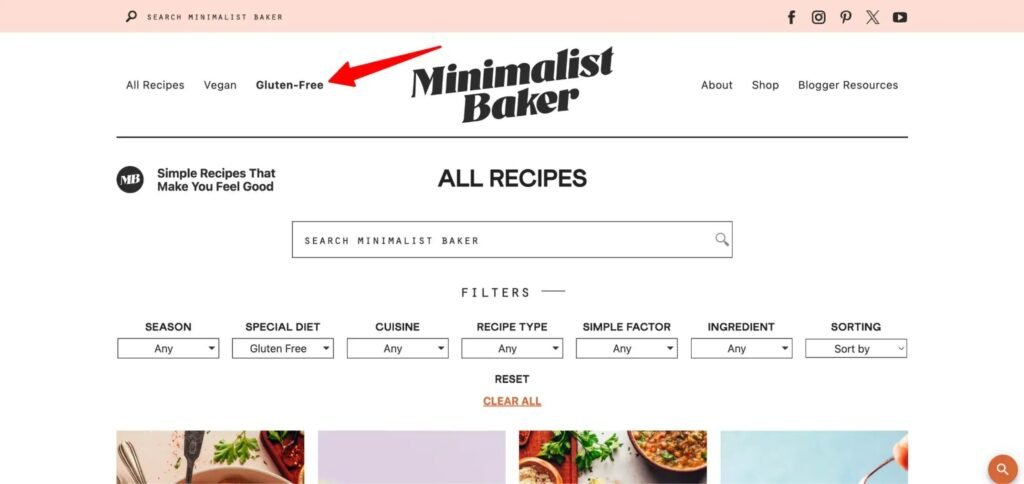
Users should find products quickly without confusion, as complex navigation increases drop-offs and reduces the chances of completing purchases.
Simplify menus, reduce unnecessary steps, and guide users clearly toward important pages and actions.
3. Trust signals and credibility
Users look for trust indicators before making decisions, including reviews, ratings, secure checkout badges, and clear return policies.
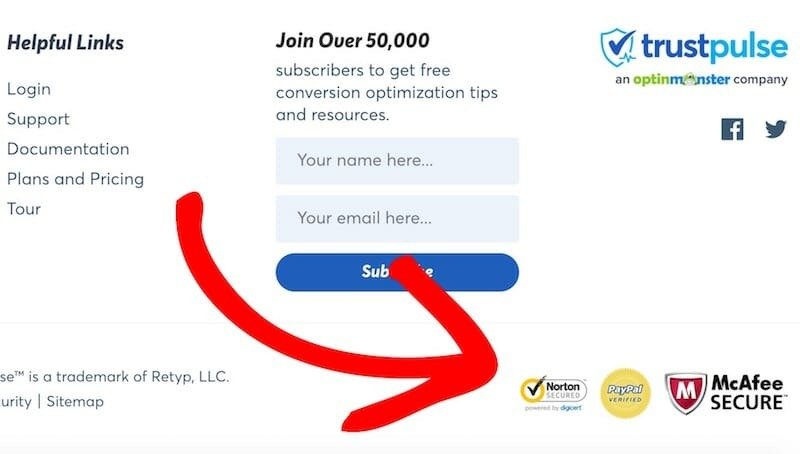
Adding these elements increases confidence and improves the likelihood of conversions and repeat visits.
4. Layout and content placement
Important information should appear clearly without forcing users to search, helping them make decisions faster and stay engaged longer.
Highlight pricing, benefits, and calls-to-action in visible areas that guide user attention effectively.
Without a strong user experience, visitors leave quickly, sending negative signals that reduce rankings and limit your ecommerce growth potential.
13. Tracking, Analytics & Continuous Optimization
Without proper tracking, ecommerce SEO becomes guesswork, making it difficult to understand which efforts drive traffic, conversions, and revenue growth.
Marketers say improving SEO and growing organic presence is their top inbound marketing priority, highlighting the need for continuous tracking.
What you should monitor regularly:
- Organic traffic trends across category and product pages.
- Keyword rankings for high-intent and revenue-driving queries.
- Conversion rates generated from organic search traffic.
- User behavior signals like bounce rate and session duration.
Essential tools for accurate tracking:
| Tool | Purpose |
| Google Analytics | Tracks traffic, behavior, and conversions |
| Search Console | Monitors indexing and keyword performance |
| SEO Tools | Tracks rankings and competitor insights |
SEO performance changes constantly, so ongoing tracking and optimization help you identify issues early and maintain consistent ecommerce growth.
Contact Us — Get Expert Help to Perform Your Ecommerce SEO Audit the Right Way
Even after understanding the process, identifying and fixing real SEO issues requires experience, tools, and a clear execution strategy. Most ecommerce stores miss critical gaps because audits are done partially, without connecting technical issues to actual business impact.
Instead of guessing what’s wrong, working with experts helps you uncover hidden problems, prioritize fixes, and implement changes that drive measurable growth.
What you get with expert support:
- Complete audit covering technical, content, and authority factors.
- Clear action plan focused on rankings, traffic, and conversions.
- Data-backed insights instead of assumptions or generic recommendations.
If your ecommerce SEO is not delivering expected results, it’s time to fix what’s actually holding your growth back.
Connect with Codexxa to get a complete ecommerce SEO audit that identifies real issues and helps you scale traffic, visibility, and revenue.
Add Comment